Table of Contents
In today’s hyper-connected world, parents face a constant tug-of-war: wanting their children to benefit from technology’s educational and social opportunities while desperately trying to shield them from its addictive grasp. The glow of screens has become a near-constant companion for many kids, potentially impacting sleep, attention spans, and even face-to-face social skills. It’s a modern parenting paradox that leaves many feeling overwhelmed and unsure where to draw the line. Enter a surprising potential ally in this battle – the kids’ smartwatch. But not the flashy, app-crammed versions of the past. We’re talking about a new generation of thoughtfully designed wearables specifically engineered to reduce screen dependency, not fuel it.
Gone are the days when a child’s first wearable was simply a mini-smartphone on the wrist, often becoming another vector for endless scrolling and notifications. The smartwatches emerging now represent a significant shift in philosophy. They prioritize essential connectivity and safety features while deliberately minimizing the very elements that foster addiction – vibrant color displays, endless app stores, and constant social media pings. These devices are built on the understanding that the goal isn’t just to monitor a child, but to empower parents and, crucially, to help children themselves develop healthier, more mindful relationships with technology from the earliest age. It’s about finding that sweet spot between safety, simplicity, and fostering genuine screen-time awareness.
Top 10 Kids Smartwatches for Screen Time Control
Detailed Product Reviews
1. Smart Watch for Kids, 1.54" HD Touchscreen Watches with 26 Games, Camera, Video Recorder, Music, Pedometer, Alarm Clock Calendaring, Flashlight, IP67 Waterproof Birthday Toys for 3-12 Years Old Kids

Overview: This SIM-free smartwatch targets young children (3-12 years) as a playful, educational first wearable. It emphasizes offline functionality with no cellular connectivity, focusing on games, creativity, and basic activity tracking without distractions from calls or internet access.
What Makes It Stand Out: Its standout feature is the rich preloaded educational content—26 logic/math games, audiobooks, and learn cards—paired with a functional HD camera for photos/videos. The IP67 waterproofing, USB-C charging, and 3-7 day battery life enhance durability and convenience, while parent-controlled screen timers add safety.
Value for Money: Priced affordably as an entry-level toy, it avoids recurring costs (no SIM/app fees). Compared to cellular watches, it’s ideal for parents prioritizing screen-free learning over communication—offering more games and creative tools than budget alternatives.
Strengths and Weaknesses: Strengths: Truly distraction-free; robust educational suite; easy setup; long battery. Weaknesses: No GPS/location tracking; camera quality is basic; limited to preset content (no app expansion).
Bottom Line: A superb starter watch for fostering creativity and healthy habits in young kids; skip if you need real-time location or calling features.
2. AXYWINBO Kids Smart Watch for Boys Girls 4g GPS Call Text-Smart Watch for Kids Game Camera Pedometer Alarm Clock Calculator-Kid Watches for Boys Girls 4-12 Age Gifts Black

Overview: This 4G-enabled smartwatch merges communication and safety for kids aged 4-12, featuring video calls, GPS tracking, and classroom management. It requires a SIM card for core functions, positioning itself as a hybrid phone/safety device.
What Makes It Stand Out: Real-time GPS + LBS location tracking via the JuniCare app and customizable safety zones (500m+ radius) provide critical peace of mind. The 4G video calling, SOS emergency button, and strict “Class Mode” (disabling non-essential features) cater to safety-conscious parents.
Value for Money: Mid-priced for a 4G watch, but ongoing SIM/data costs add up. Justifies its cost with reliable location accuracy and robust parental controls—beating cheaper GPS trackers with inferior app integration.
Strengths and Weaknesses: Strengths: Precise location monitoring; dependable video calling; strong classroom restrictions. Weaknesses: App setup can be complex; 700mAh battery drains fast with GPS/video use; limited game utility.
Bottom Line: A practical choice for parents needing reliable location tracking and communication; opt for this over non-GPS models if safety is non-negotiable.
3. PlayZoom 4 Kids Smartwatch – 1.83” Color Touchscreen, 25+ Games, Selfie Camera, Audiobooks, Songs, Step Tracker, Parental Controls, Waterproof, for Ages 4-12 (Black)
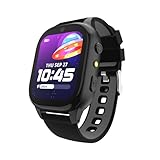
Overview: Designed as a content-rich, offline entertainment hub for ages 4-12, this watch skips cellular features entirely. It prioritizes a large display, preloaded educational media, and simple activity tracking without app dependencies.
What Makes It Stand Out: The expansive 1.83” screen enhances usability, while 25+ STEM/motion games, 10 audiobooks, and 10 sing-along songs deliver exceptional offline value. The waterproof design and step tracker support active play, all without requiring Wi-Fi or downloads.
Value for Money: Excellent for its niche—beating similar non-cellular watches with superior screen size and bundled content. No hidden fees make it cheaper long-term than GPS/calling models, though it lacks safety features.
Strengths and Weaknesses: Strengths: Vibrant screen; abundant preloaded learning tools; truly app-free; intuitive for kids. Weaknesses: No location tracking or calling; battery life lags behind competitors; camera quality is modest.
Bottom Line: Ideal for screen-time-focused play and learning; choose this for creative engagement but avoid if safety tracking is essential.
4. TickTalk 5 - Kids Smart Watch with GPS Tracker, Video Calling, SOS, & Parental Controls | Smartwatch with Free Music, Texting, Kid Phone Call and Text, Boys & Girls - 4G Smart Watch for Kids 3-12

Overview: The premium 4G LTE smartwatch for serious safety and communication, featuring advanced GPS, video calls, and comprehensive parental controls. It functions as a standalone phone with robust security layers.
What Makes It Stand Out: Google Maps-powered location tracking with AI-enhanced “SmartPin” (for indoor accuracy) and real SMS support (blocking unknown numbers) set it apart. SignalBooster tech ensures network reliability, while end-to-end encrypted messaging and School Mode offer unparalleled control.
Value for Money: Highest upfront cost, plus potential subscription fees. Justifies price with military-grade security, precise location data, and no competitor matches its parental control depth—making it worth the investment for high-risk environments.
Strengths and Weaknesses: Strengths: Best-in-class GPS accuracy; secure real SMS; 100+ hour battery; extensive parental controls. Weaknesses: Expensive; app complexity for novice users; limited game/entertainment focus.
Bottom Line: The top-tier choice for safety-critical scenarios; spend extra if location precision and communication security are paramount.
5. Kids Smart Watch with Fitness Tracker, Waterproof, Heart Rate/Sleep Monitor, Sport Mode, Camera, Video, Recorder, Music, DIY Wallpaper, Game, SOS Button, NO APP/Phone, Gifts for Boy Girl 4-13 Year Old

Overview: A feature-dense, app-free fitness and safety watch for kids 4-13, emphasizing health monitoring alongside core smart features. It operates standalone but pairs with phones for expanded functionality.
What Makes It Stand Out: Unique 24/7 health tracking (heart rate, sleep stages, blood oxygen) using a pediatric database, plus IP68 waterproofing and ultra-fast charging (0.5 hours). The “Reward Coins” system motivates activity/learning, and DIY watch faces boost personalization.
Value for Money: Mid-to-high price point. Excels as an all-in-one device—health tracking, fitness modes, and app-free usability beat cheaper watches. Avoids subscription fees but health metrics may lack medical accuracy.
Strengths and Weaknesses: Strengths: Comprehensive health suite; exceptional battery life (1 week); rugged IP68 rating; no mandatory app. Weaknesses: Health data reliability unverified for kids; complex features may overwhelm young users.
Bottom Line: Best for health-conscious parents wanting fitness engagement; prioritize this over basic models if wellness tracking matters more than pure safety.
6. Kids Watch with GPS Tracker, Two-Way Calling, Real-Time Tracking & SOS Alerts - Kids Smart Watches for Girls with Geo-Fencing, School Mode, Water Resistant, Long Battery Life & Parental Controls

Overview: This GPS-enabled smartwatch prioritizes child safety with real-time location tracking, two-way calling, and SOS alerts. Designed for parents seeking peace of mind, it features geo-fencing, school mode, and robust parental controls via a dedicated app, targeting girls aged 3-12 with a focus on security over entertainment.
What Makes It Stand Out: Its standout features include nationwide real-time tracking with instant geo-fence alerts, parent-controlled contact lists, and secure messaging without internet access. The IP67 water resistance, shockproof build, and structured “School Mode” differentiate it from basic toy watches, emphasizing safety in everyday use.
Value for Money: At $9/month subscription (required), it offers comprehensive safety features like unlimited GPS tracking and video calling, undercutting competitors. While the recurring cost is mandatory, the included parental controls, durability, and educational engagement justify the price for safety-focused families.
Strengths and Weaknesses: Strengths: Reliable geo-fencing alerts; long 12-24hr battery; no internet access enhances security; school mode minimizes distractions. Weaknesses: Carrier compatibility limitations; subscription adds ongoing cost; limited entertainment features compared to non-GPS models.
Bottom Line: Ideal for parents prioritizing safety over play, this watch delivers essential tracking and communication at a reasonable subscription cost. Its durability and parental controls make it a practical, if not flashy, investment for vigilant caregivers.
7. TickTalk5 Smart Watch for Kids with GPS Tracker, Video Calling, Texting, and Parental App, 4G Smartwatch with Free Music, Phone Calls, and Reminders for Kids Ages 3-12

Overview: The TickTalk5 is a premium 4G LTE kids’ smartwatch offering advanced safety and communication features. It supports HD video/voice calls, real SMS texting, and precise GPS tracking via an AI-enhanced “SmartPin” system, all managed through a powerful parental app for children aged 3-12.
What Makes It Stand Out: Its AI-powered location correction (SmartPin) ensures unmatched indoor/outdoor accuracy, while real SMS support bypasses app dependency. SignalBooster technology guarantees wide network coverage, and end-to-end encrypted messaging plus 100+ hour battery life set it apart in reliability and security.
Value for Money: Positioned at a higher price point, it justifies cost with no hidden subscription fees for core features (unlike many rivals), free music, and superior performance. The robust parental controls and global 4G coverage offer long-term value despite the initial investment.
Strengths and Weaknesses: Strengths: Pinpoint GPS accuracy via AI; true SMS compatibility; exceptional battery life; military-grade parental controls; free music streaming. Weaknesses: Premium pricing; potential carrier restrictions; complex setup for non-tech-savvy parents.
Bottom Line: A top-tier choice for parents seeking cutting-edge safety and connectivity. Its AI tracking, SMS capability, and no-fee core features make it worth the splurge for those prioritizing precision and versatility.
8. Smart Watch for Kids Girls Gift Age 3-12 with 39 Games Alarm Clock Camera Video Music Player Pedometer Flashlight 12/24 hr HD Touch Screen Kids Smart Watch Birthday Toys for 4 5 6 7 8 9 10 Year Olds

Overview: This non-GPS smartwatch is an entertainment-focused toy for kids aged 4-12, packed with 39 games, a camera, music player, and educational tools. It emphasizes fun and skill-building (like time management) without safety tracking, serving as a durable, screen-based activity device.
What Makes It Stand Out: With 39 diverse games (36 puzzles + 3 sports), a 15,000-photo storage camera, and audiobooks, it excels as an educational toy. The silicone protective case, breathable strap, and parental game-time controls cater specifically to active children’s durability and engagement needs.
Value for Money: As a one-time purchase with no subscriptions, it’s highly cost-effective for pure entertainment. While lacking GPS safety features, the breadth of games, camera, and learning tools offers exceptional bang-for-buck as a birthday gift or screen-time alternative.
Strengths and Weaknesses: Strengths: Abundant games boost cognitive skills; high photo storage capacity; drop-proof design; no ongoing costs; educational alarms/audiobooks. Weaknesses: Zero GPS/safety features; camera/video quality is basic; limited real-world utility beyond play.
Bottom Line: Perfect as a fun, educational toy for screen-limited households. Avoid if safety tracking is needed, but ideal for gifting to kids who want interactive play without subscriptions or parental monitoring stress.
9. Kids Watch with GPS Tracker, Two-Way Calling, Real-Time Tracking & SOS Alerts - Smart Watch for Kids Call and Text with Geo-Fencing, School Mode, Water-Resistant, Long Battery Life & Parental Controls

Overview: Nearly identical to Product 6, this GPS watch delivers core safety functionalities: real-time tracking, two-way calling, SOS alerts, and geo-fencing. It targets safety-conscious parents with a focus on school-friendly features like “School Mode” and IP67 water resistance for kids aged 3-12.
What Makes It Stand Out: The seamless mobile app setup (iOS/Android) and $9/month flexible subscription model stand out, offering nationwide coverage with no tech expertise required. Parent-approved contacts, secure messaging, and durable construction ensure reliable daily use without internet risks.
Value for Money: Matching Product 6’s value proposition, the affordable subscription covers unlimited tracking/calling. It’s competitively priced against similar GPS watches, though the mandatory fee may deter budget buyers seeking one-time purchases.
Strengths and Weaknesses: Strengths: Intuitive app management; strong geo-fencing alerts; school mode reduces distractions; 12-24hr battery suits daily wear. Weaknesses: Carrier incompatibility limits flexibility; repetitive features vs. Product 6; minimal entertainment value.
Bottom Line: A dependable, no-frills safety watch. Choose this over Product 6 only if minor feature variations (e.g., app interface) matter—otherwise, it’s a near-identical alternative prioritizing essential tracking at a fair subscription cost.
10. BIGGERFIVE Smart Watch for Kids No APP No Phone Needed, 1.8" Fitness Tracker Watch Pedometer, Heart Rate, Sleep Monitor, IP68 Waterproof, Step Counter, Puzzle Games for Girls Boys Teens 5-16, Blue

Overview: This fitness-focused smartwatch operates independently (no app/phone required) as a health tracker for kids 5-16. It emphasizes activity monitoring (steps, heart rate, sleep) and light entertainment via puzzle games, with IP68 waterproofing for active lifestyles.
What Makes It Stand Out: True standalone functionality sets it apart—no mandatory app or subscription. The 1.8" HD screen, 80+ sports modes, and photo-customizable watch faces cater to teens, while parental game controls via optional app balance fun and focus.
Value for Money: Excellent value as a one-time purchase with zero subscriptions. The fitness tracking depth (heart rate, sleep) rivals pricier adult wearables, though accuracy may vary. Ideal for health-conscious families avoiding recurring fees.
Strengths and Weaknesses: Strengths: Truly app-optional operation; comprehensive fitness metrics; IP68 waterproofing; customizable dials; puzzle games enhance learning. Weaknesses: Heart rate/sleep tracking less precise than medical devices; no GPS/safety features; limited app integration depth.
Bottom Line: A superb budget fitness tracker for active kids, but not a safety device. Best for parents teaching healthy habits without subscriptions—skip if location tracking or emergency calls are priorities.
Understanding Screen Addiction in Children
Defining the Modern Challenge
Screen addiction in children isn’t just about excessive time spent; it’s characterized by an inability to self-regulate usage, withdrawal symptoms when devices are taken away, and a significant impact on daily life like declining school performance or reduced physical activity. Unlike adults, children’s developing brains are particularly vulnerable to the dopamine-driven feedback loops designed into many apps and games, making them more susceptible to compulsive use. Recognizing the signs – irritability, loss of interest in offline activities, or using screens as the primary coping mechanism – is the crucial first step for any parent.
Why Traditional Smartphones Exacerbate the Problem
Putting a full-featured smartphone in a child’s hands, often as their first connected device, frequently backfires for screen time management. The sheer volume of instantly accessible, highly engaging content – social media, games, streaming – creates an environment ripe for overuse. The constant barrage of notifications acts as a powerful behavioral trigger, training the brain to seek the next ‘ping’. Furthermore, the portability means screens infiltrate every aspect of a child’s day, from the dinner table to bedtime, displacing essential activities like unstructured play, homework focus, and restorative sleep.
The Wearable Opportunity: A Different Approach
This is where the strategic use of a purpose-built kids’ smartwatch presents a unique opportunity. By offering core communication and safety functions in a form factor inherently less suited for prolonged, immersive screen engagement, these devices can act as a transitional tool. They provide the peace of mind of connectivity without the overwhelming temptation of a pocket-sized entertainment hub. The key lies in selecting a watch designed from the ground up with digital wellbeing as a core principle, not just an afterthought feature.
Essential Features for Promoting Digital Wellbeing
Minimalist Display Design Principles
The screen itself is the frontline in the battle against distraction. Look for devices featuring monochrome or limited-color e-ink or low-resolution LCD displays. These are significantly less stimulating to the brain than vibrant, high-definition color touchscreens. Smaller screen sizes also naturally discourage extended viewing sessions. Avoid watches with glossy, reflective surfaces that constantly draw the eye; matte finishes are less attention-grabbing and reduce the urge to constantly check the device.
Intentional Interaction Methods
How a child interacts with the watch matters immensely. Physical buttons for core functions (like answering calls or activating GPS) are vastly preferable to touchscreens. Touch interfaces invite exploration, swiping, and tapping – behaviors directly linked to addictive app usage patterns. Buttons create a deliberate, finite action: press to call mom, press to check location. This reduces mindless interaction and reinforces that the device serves specific, limited purposes, not endless browsing.
Curated Communication, Not Constant Connection
True safety lies in controlled communication, not 24/7 availability. Essential features should include pre-approved contact lists for calls and messages, ensuring interaction is limited to trusted family and friends. Critical functionality like SOS alerts or one-touch emergency calling to designated numbers is non-negotiable. However, avoid devices offering open messaging platforms, social media access, or the ability to freely add contacts. The goal is streamlined, safe communication, not replicating the chaotic connectivity of a smartphone.
Prioritizing Safety Without the Screen Trap
Location Tracking with Purpose
Accurate GPS and cellular/Wi-Fi location tracking are fundamental safety features, providing parents peace of mind. However, the implementation affects screen time. Opt for systems where location updates are primarily initiated by the parent via an app (e.g., checking “Where is my child?”), rather than the child constantly interacting with a map interface on their watch. Real-time tracking should be a parental monitoring tool, not a feature the child engages with directly on their device.
Geofencing for Peace of Mind, Not Child Monitoring
Geofencing (setting virtual boundaries) is incredibly useful for alerts when a child arrives at school or leaves a safe zone. Crucially, this feature should operate silently in the background from the child’s perspective. The watch shouldn’t bombard the child with notifications every time they cross a boundary; that creates unnecessary screen interaction. The alerts belong solely in the parent’s monitoring app, keeping the child’s device experience clean and focused.
Battery Life as a Digital Detox Enabler
Long battery life (ideally 2-3 days or more on a single charge) is unexpectedly vital for reducing screen dependency. Frequent, daily charging rituals can become another point of friction and negotiation. More importantly, a watch that reliably lasts through weekends or school trips means fewer opportunities for the device to become a central focus during charging downtime. It subtly encourages the child to disengage and exist without the constant presence of the wearable, fostering independence.
Designing for Durability and Distraction-Free Use
Rugged, Child-Centric Construction
Kids are hard on gear. A watch built to withstand drops, splashes, and the general chaos of childhood play is essential. Look for robust materials, secure strap mechanisms (silicone is ideal), and water resistance suitable for handwashing or rainy days. A flimsy device that breaks easily leads to frustration and potentially faster replacement with less suitable alternatives. Durability ensures the focus remains on the device’s purpose, not its fragility.
The Importance of Offline Functionality
A truly healthy wearable minimizes reliance on constant connectivity. Features that work independently of the parent’s phone or app are valuable. This includes basic step counting (as a gentle nudge towards activity, not obsessive tracking), a simple alarm clock function, or even a basic stopwatch. These provide minor utility without requiring interaction with a paired smartphone app, reducing the overall digital footprint of the device in the child’s life.
Avoiding the App Store Pitfall
This cannot be overstated: steer completely clear of any kids’ smartwatch that offers access to a third-party app store or downloadable games beyond the most basic, pre-installed utilities (like a calculator or flashlight). The moment an open app ecosystem is introduced, the device morphs into a miniature smartphone, instantly negating any potential benefits for reducing screen addiction. The curated, limited functionality is the entire point of choosing this type of wearable.
Implementing Healthy Usage Habits
Setting Clear Expectations Together
Introducing any device requires upfront, age-appropriate conversations. Explain why this watch is different: it’s for safety and quick check-ins, not for playing games or chatting endlessly. Involve the child in setting basic rules – perhaps it stays on the charger overnight, or isn’t worn during homework or family meals. Co-creating these boundaries fosters understanding and buy-in, making enforcement smoother than arbitrary restrictions.
Leveraging Parental Controls Wisely
The companion app is your command center. Use scheduling features to automatically disable non-essential functions during school hours, homework time, or after a set bedtime. Utilize usage reports not for micromanagement, but to have constructive conversations: “I noticed you used the call button a lot after school; is everything okay?” Focus controls on enabling safety features while gently guiding behavior, not creating an atmosphere of constant surveillance that breeds resentment.
Modeling Healthy Tech Behavior
Children learn infinitely more from what they see than what they’re told. Be mindful of your own screen habits. Put your phone away during meals, engage in device-free activities as a family, and verbalize your own screen time choices (“I’m putting my phone in another room so I can focus on this book”). Demonstrating a balanced relationship with technology provides the most powerful context for why the watch has its specific, limited role.
Beyond the Device: Fostering Holistic Wellbeing
The Critical Role of Unstructured Play
No wearable, no matter how well-designed, can replace the developmental necessity of unstructured, screen-free play. Actively encourage and facilitate time for imaginative games, outdoor exploration, reading physical books, or creative hobbies. The watch should fit around these essential activities, not dictate or interrupt them. View it as a safety net that allows for more freedom during these offline periods.
Building Intrinsic Motivation for Offline Time
Help children discover the inherent joy and satisfaction in offline activities. Connect screen time limits to positive experiences: “After we finish this puzzle, we can go kick the soccer ball.” Focus on the benefits they feel – “Don’t you sleep better when we read a book instead of watching something before bed?” Cultivating this internal motivation for screen breaks is far more sustainable than relying solely on external device restrictions.
Open Communication is the Real Safeguard
Ultimately, the most effective protection against screen overuse isn’t a feature on a watch, but an open, trusting relationship. Create a safe space where children feel comfortable talking about online experiences, pressures they feel, or struggles with self-regulation. Regular, non-judgmental check-ins about their digital life (“What was the coolest thing you learned online this week? Was there anything that made you feel worried?”) build resilience that no technology can replicate.
Frequently Asked Questions
Frequently Asked Questions
Can a kids’ smartwatch really help reduce screen addiction? Yes, when specifically designed with digital wellbeing as a core principle. By eliminating addictive elements like color touchscreens, endless apps, and social media, and focusing solely on essential safety communication, these watches remove a significant source of temptation, making it easier for children to disengage.
What’s the biggest feature to avoid for preventing screen time issues? Absolutely avoid any watch with access to an open app store or downloadable games beyond basic utilities. This instantly transforms the device into another screen-based entertainment platform, defeating the entire purpose of choosing a minimalist wearable.
How do I explain the limitations of this watch to my child compared to friends’ devices? Focus on the “why”: “This watch is special because it’s just for keeping us connected safely when you’re out playing, not for games or chatting all day. That way, you can focus on having fun with your friends in real life and get better sleep!” Emphasize the benefits of less screen distraction.
Is GPS tracking necessary if the main goal is reducing screen time? GPS is primarily a safety feature, but its implementation matters. Choose systems where tracking happens silently in the background (visible only to parents via their app), not something the child interacts with on the watch screen, to avoid adding unnecessary screen interaction.
Won’t my child just want a smartphone eventually anyway? This watch serves as a responsible transitional tool. By establishing healthy habits and boundaries before smartphone introduction, you build a foundation of digital literacy and self-regulation, making the eventual transition to a more capable device potentially smoother and less chaotic.
How important is battery life for managing screen time? Very important. Long battery life (2-3+ days) minimizes daily charging rituals that become screen-time negotiation points. It also allows the child to exist comfortably without the device for periods, subtly reinforcing that life continues just fine offline.
Should the watch have a camera? Generally, no. Cameras add significant complexity, storage needs, and potential for inappropriate use or distraction. They are rarely essential for core safety communication and introduce privacy concerns that outweigh minimal benefits for young children.
How do I enforce screen time rules on the watch itself? Utilize the parental control app’s scheduling features to automatically disable non-essential functions (like messaging) during school, homework, meals, and sleep. Focus enforcement on the schedule (“Messaging turns off at 7 PM for bedtime”) rather than constant monitoring of individual actions.
Can these watches replace parental involvement in screen time management? No device is a substitute for active parenting. These watches are tools to support your efforts by removing major distractions. Consistent conversations, setting a good example, and fostering offline interests remain the most critical factors in combating screen overuse.
At what age is a minimalist smartwatch appropriate? This depends heavily on the child’s maturity and need for independent mobility (e.g., walking to school, after-school activities). Generally, ages 6-8+ are common starting points, but prioritize the child’s ability to understand and follow the device’s limited purpose over a specific age. Always base the decision on your child’s individual readiness.
See Also
- 10 Best Kids Smartwatches for Preventing Screen Overuse in 2026
- Best Screen Protectors for Smartwatches for Kids: 10 Expert Picks for 2026
- Solving Screen Time Worries: Best Kids Smartwatches with Limited Games & Distraction-Free Design
- 10 Best Kids Smartwatches for Limiting Screen Time Without Conflict in 2026
- 10 Expert-Recommended Kids Smartwatches for First-Time Tech Users in 2026