Table of Contents
Ever felt that familiar ache creeping in after just an hour of wearing your headset? That subtle pressure on your temples, the slight warmth building around your ears, or the nagging sense that the device is slowly sliding down your face? If you spend significant time in calls, gaming sessions, virtual meetings, or immersive audio experiences, you know the struggle isn’t just about sound quality—it’s about enduring the physical burden on your head and ears. Discomfort isn’t just annoying; it fractures your focus, drains your energy, and turns what should be productive or enjoyable time into a countdown until you can finally take the headset off. The quest for true comfort during extended wear isn’t a luxury; it’s a fundamental requirement for anyone whose ears are tethered to technology for hours on end.
The solution lies far beyond simply finding the “lightest” option on a spec sheet. True comfort is a sophisticated interplay of weight distribution, materials science, ergonomic design, and how those elements interact with the unique topography of your head. A headset might weigh next to nothing on a scale, but if that weight concentrates on a single pressure point, it will feel like a ton after ninety minutes. Conversely, a slightly heavier model with brilliant engineering can vanish from your awareness for hours. Understanding the why and how behind comfort—what actually makes a headset disappear on your head—is infinitely more valuable than chasing a single-number weight rating. This guide cuts through the marketing noise to explore the critical, often overlooked, features that transform a headset from a necessary tool into a seamless extension of your daily workflow or entertainment.
Top 10 Lightweight Headsets
Detailed Product Reviews
1. Koss KPH7 Lightweight Portable Headphone, Black

Overview: The Koss KPH7 is a no-frills, entry-level on-ear headphone designed for basic audio consumption. Targeted at casual listeners seeking affordability and portability, it delivers fundamental sound reproduction without advanced features or connectivity options. Its simplicity makes it suitable for everyday use with smartphones, tablets, or portable media players.
What Makes It Stand Out: Its standout feature is the exceptional lightweight design (only 60g) and adjustable headband, ensuring comfort during extended wear. The focus on deep bass response within its limited frequency range (80-18,000 Hz) provides a punchy, engaging sound for its price point, appealing to bass-conscious listeners on a tight budget.
Value for Money: Priced very low, the KPH7 offers remarkable value for users needing basic, durable headphones for commuting, exercise, or casual listening. While lacking modern features like microphones or noise isolation, it outperforms many similarly priced competitors in sound quality and build, making it ideal for budget-conscious buyers prioritizing core audio performance.
Strengths and Weaknesses: Strengths: Extremely lightweight and comfortable; strong bass for genre like hip-hop/pop; durable construction; affordable. Weaknesses: Limited high-frequency detail; minimal passive noise isolation; thin padding on headband/earcups; cord lacks tangle resistance; no microphone or controls.
Bottom Line: An excellent budget choice for casual listeners prioritizing portability and bass-heavy sound. Avoid if you need features like mic support, noise isolation, or nuanced audio fidelity; otherwise, it delivers outstanding core performance per dollar.
2. Logitech H151 Wired Headset, Analog Stereo Headphones with Rotating Noise-Cancelling Microphone, 3.5 mm Audio Jack, in-Line Controls, PC/Mac/Laptop/Tablet/Smartphone - Black

Overview: The Logitech H151 is a versatile analog stereo headset built for clear communication across calls, meetings, and multimedia. Designed for universal compatibility, it targets remote workers, students, and casual users needing reliable audio and voice tools for PCs, laptops, and mobile devices without complex setup.
What Makes It Stand Out: The rotating, noise-cancelling boom microphone is its key asset, effectively minimizing background noise while offering flexible left/right wear and stowability. Combined with full stereo sound, comfortable foam earcups, and intuitive in-line controls, it bridges the gap between basic headsets and premium communication tools.
Value for Money: Positioned affordably, the H151 justifies its cost through robust build quality, universal 3.5mm connectivity, and features typically found in pricier models (like rotating mic and stereo audio). It outshines ultra-budget headsets with clearer call quality and comfort, making it a smart investment for frequent remote communicators.
Strengths and Weaknesses: Strengths: Excellent noise-cancelling mic clarity; comfortable for long sessions; flexible mic placement; universal compatibility; sturdy build. Weaknesses: Analog audio quality lacks richness for music; earcups may feel warm over time; no mute indicator light; basic aesthetics.
Bottom Line: Highly recommended for professionals and students needing dependable, clear voice calls and decent multimedia audio. Its comfort, mic quality, and plug-and-play versatility offer exceptional value for everyday communication tasks.
3. NUBWO HW02 USB Computer Headset with Clear Chat Microphone, Lightweight On-Ear Wired Headset for MS Teams, Skype, Webinars, Call Center and More (Black)
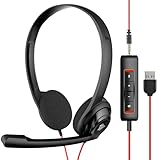
Overview: The NUBWO HW02 is a lightweight USB/3.5mm hybrid headset engineered for productivity in busy workspaces. It targets remote teams, call centers, and frequent webinar participants, emphasizing clear voice communication through integrated digital signal processing and exceptional comfort during marathon usage.
What Makes It Stand Out: Its enhanced Digital Signal sound card in the control box delivers notably clearer voice reproduction than typical analog headsets, while the ultra-lightweight (60g) design prevents fatigue. The mute indicator light and detachable USB control box (for PC/Mac) add practical, user-friendly touches absent in many competitors.
Value for Money: Offering unique packaging options (1/5/10 packs) enhances its value for businesses. The HW02’s blend of USB digital clarity, smartphone compatibility via 3.5mm, and all-day comfort justifies its mid-range price, outperforming single-purpose headsets for hybrid work environments.
Strengths and Weaknesses: Strengths: Crystal-clear voice chat with noise reduction; incredibly lightweight; mute indicator light; versatile USB/3.5mm connectivity; business-friendly bulk options. Weaknesses: On-ear design offers minimal noise isolation; bass response is muted for music; USB control box adds cord complexity.
Bottom Line: A top pick for professionals prioritizing vocal clarity and comfort in extended work sessions. Ideal for teams needing reliable, easy-to-deploy headsets, though audiophiles should seek richer audio options.
4. Logitech H111 Wired Headset, Stereo Headphones with Noise-Cancelling Microphone, 3.5 mm Audio Jack, PC/Mac/Laptop/Smartphone/Tablet - Black

Overview: The Logitech H111 is a budget-friendly stereo headset focused on essential communication tasks. It serves entry-level users needing straightforward audio and voice capabilities for calls, basic multimedia, and light computing across Windows, Mac, and mobile platforms via its universal 3.5mm jack.
What Makes It Stand Out: It distinguishes itself through true stereo sound (uncommon in ultra-budget headsets) and a rotating noise-cancelling microphone that effectively isolates voice from ambient noise. The adjustable headband ensures a secure fit, making it practical for daily office or home use without premium pricing.
Value for Money: As one of the most affordable stereo headsets with a dedicated mic, the H111 delivers exceptional core functionality. It surpasses cheaper mono headsets in audio quality for both calls and music, offering reliable performance for under $20—ideal for cost-sensitive buyers or bulk deployments.
Strengths and Weaknesses: Strengths: Genuine stereo sound for music/movies; effective noise-cancelling mic; lightweight and comfortable; broad device compatibility; very low cost. Weaknesses: Thin ear padding reduces long-term comfort; mic clarity lags behind pricier models; no inline controls; plasticky build.
Bottom Line: Highly recommended for budget-conscious users needing basic stereo audio and clear voice calls. While not luxurious, it’s the best value for essential headset functionality where premium features aren’t required.
5. Logitech H391 Wired Headset for PC/Laptop, Stereo Headphones with Noise Canceling Microphone, USB-C, in-Line Controls, Works with Chromebook - Graphite

Overview: The Logitech H391 is a modern USB-C headset designed for seamless integration with contemporary laptops and Chromebooks. It caters to professionals seeking plug-and-play simplicity, clear digital audio, and all-day comfort for meetings, calls, and multimedia without software installation.
What Makes It Stand Out: USB-C plug-and-play functionality eliminates compatibility hassles, while fine-tuned digital stereo drivers deliver richer, more balanced sound than analog counterparts. The rotating noise-canceling mic and plush leatherette ear cushions prioritize both audio quality and extended-wear comfort, standing out in its class.
Value for Money: Priced moderately, the H391 justifies its cost with future-proof USB-C connectivity, superior digital audio clarity, and premium comfort features. It outperforms similarly priced 3.5mm headsets for computer-centric use, especially on Chromebooks or modern ultrabooks lacking audio jacks.
Strengths and Weaknesses: Strengths: Excellent USB-C convenience; rich digital stereo sound; supremely comfortable earcups; effective rotating mic; simple inline controls. Weaknesses: Limited to USB-C devices (no 3.5mm fallback); mic performance adequate but not exceptional; slightly bulky design.
Bottom Line: An outstanding choice for USB-C laptop/Chromebook users prioritizing ease of use, comfort, and clear digital audio. Highly recommended for remote workers, though those needing smartphone compatibility should consider hybrid models.
6. Logitech H390 Wired Headset for PC/Laptop, Stereo Headphones with Noise Cancelling Microphone, USB-A, in-Line Controls, Works with Chromebook - Rose

Overview:
The Logitech H390 is an entry-level wired USB-A headset targeting budget-conscious users for everyday PC, laptop, or Chromebook tasks like calls, meetings, and light media consumption. Its plug-and-play simplicity eliminates software dependencies, making it ideal for casual or shared environments.
What Makes It Stand Out:
Its rotating noise-cancelling boom mic is a key differentiator, tucking away when unused while effectively minimizing background chatter during calls. The in-line controls for volume and mute offer seamless adjustments, and the soft leatherette ear cushions provide surprising comfort for extended wear at this price point.
Value for Money:
Priced affordably, the H390 delivers exceptional value for users needing reliable basic functionality without wireless complexity. It outperforms cheaper no-name headsets in mic clarity and build quality, though it lacks premium audio depth for critical listening or gaming.
Strengths and Weaknesses:
Strengths: True plug-and-play USB setup; effective noise-cancelling mic; comfortable for moderate sessions; durable swivel-mount design; works flawlessly with Chromebooks.
Weaknesses: Sound quality is adequate but lacks bass richness; plastic build feels lightweight (not premium); ear cushions may retain heat during long use; mic positioning requires precision for optimal noise cancellation.
Bottom Line:
An excellent budget headset for clear voice calls and everyday computing. Ideal for students, remote workers on a tight budget, or as a reliable backup—just don’t expect audiophile sound or all-day marathon comfort.
7. Logitech Zone Vibe 100 Lightweight Wireless Over Ear Headphones with Noise Canceling Microphone, Advanced Multipoint Bluetooth Headset, Works with Teams, Google Meet, Zoom, Mac/PC - Graphite

Overview:
The Logitech Zone Vibe 100 is a premium wireless headset engineered for hybrid professionals who juggle video conferences, music, and multitasking across devices. Its focus on seamless integration with major platforms like Teams and Zoom makes it a modern work-from-home essential.
What Makes It Stand Out:
Advanced multipoint Bluetooth lets you switch instantly between two devices (e.g., laptop and phone), while beamforming mics with DSP deliver studio-quality voice clarity by isolating speech from background noise. The 18-hour battery life and lightweight graphite design ensure all-day comfort without fatigue.
Value for Money:
Though pricier than wired alternatives, the Vibe 100 justifies its cost with pro-grade features rarely found together: exceptional mic tech, immersive 40mm drivers for rich audio, and true wireless freedom. It competes strongly with headsets double its price for remote work performance.
Strengths and Weaknesses:
Strengths: Best-in-class noise-cancelling mic for calls; effortless multipoint connectivity; balanced, detailed sound for music/meetings; all-day battery; featherlight comfort.
Weaknesses: No active noise cancellation for ambient sound; plastic build feels less premium than competitors; limited EQ customization; charging via micro-USB (not USB-C).
Bottom Line:
A top-tier wireless headset for professionals prioritizing crystal-clear communication and versatile device switching. Highly recommended for frequent Zoom/Teams users seeking reliability without compromising on audio quality.
8. Plantronics - Blackwire 3220 - Wired Dual-Ear (Stereo) Headset with Boom Mic - USB-A to connect to your PC and/or Mac

Overview:
The Plantronics Blackwire 3220 is a business-focused wired headset designed for telephony professionals and call-center environments. It emphasizes durability, voice clarity, and safety through specialized audio engineering for heavy daily use.
What Makes It Stand Out:
SoundGuard technology is its crown jewel, protecting hearing by limiting audio spikes above 118 dBA—a rarity in consumer headsets. The noise-cancelling boom mic with DSP ensures professional-grade voice pickup, while the metal-reinforced headband guarantees longevity in high-volume settings.
Value for Money:
Priced mid-range, it’s a smart investment for businesses or telecommuters needing rugged reliability. The 2-year global warranty and safety features add significant value over cheaper headsets that lack hearing protection or robust construction.
Strengths and Weaknesses:
Strengths: Critical SoundGuard hearing protection; exceptional microphone clarity for calls; lightweight yet durable metal headband; wideband audio for natural speech; plug-and-play USB setup.
Weaknesses: Sound quality lacks bass depth for music; ear cushions may feel stiff initially; no in-line mute button (requires software control); limited comfort for non-telephony use.
Bottom Line:
The definitive choice for call-center agents or telephony professionals prioritizing voice accuracy and hearing safety. Less ideal for multimedia, but unmatched for all-day call clarity and workplace durability.
9. Amazon Basics On Ear Wired Computer Headset with Adjustable Microphone, 3.5mm Port or in-Line Control with USB-A Port, Foldable, Clear Sound, Small/Medium Size, Black

Overview:
This no-frills Amazon Basics headset targets budget buyers needing a simple, foldable solution for basic calls, online classes, or office tasks. Its dual connectivity (3.5mm or USB-A) and compact design cater to users with space constraints or multiple device types.
What Makes It Stand Out:
The flexible boom mic adjusts to any angle for optimal mouth positioning, and the unidirectional design effectively reduces ambient noise. The foldable build and included USB adapter offer versatile compatibility with PCs, laptops, or mobile devices via 3.5mm.
Value for Money:
As one of the most affordable options here, it delivers solid baseline functionality. While not luxurious, the clear audio and noise-reducing mic punch above its price point for casual users who prioritize cost over premium features.
Strengths and Weaknesses:
Strengths: Extremely budget-friendly; compact and portable; easy mute control; effective mic noise reduction; dual connectivity options; folds for storage.
Weaknesses: On-ear design requires break-in period (1–2 weeks); may feel tight for larger heads; sound quality is thin for music; plastic build feels flimsy; no leatherette ear padding.
Bottom Line:
A practical, no-nonsense headset for light, intermittent use—perfect for students or backup office duty. Manage expectations on comfort and audio richness, but it excels as a reliable entry-level tool for clear voice calls.
Understanding the True Meaning of “Lightweight” for Headsets
Beyond the Grams: The Weight Distribution Factor
Simply quoting a total weight figure is misleading. The critical factor is where that weight sits. Headsets distributing mass evenly across the headband and earcups, especially balancing front and back weight, feel significantly lighter than those with heavy earcups pulling downward. A well-designed counterbalance system prevents the “nodding off” sensation common with poorly distributed weight.
The Threshold of Comfort: How Light is Light Enough?
While individual tolerance varies, headsets consistently tipping the scales below 250 grams (approximately 8.8 ounces) are generally recognized as entering the “ultra-light” comfort zone for extended wear. However, exceeding this threshold doesn’t automatically mean discomfort; exceptional distribution in a 300g model can outperform a poorly balanced 220g set. Focus on the feel, not just the number.
Material Science: The Foundation of Low Weight
Achieving genuine lightness starts with the frame. High-grade polymers, magnesium alloys, and specialized composites offer the necessary strength-to-weight ratio without resorting to flimsy, brittle plastics. These materials form the skeleton that supports all other comfort elements while minimizing bulk.
The Critical Role of Headband Design and Padding
Self-Adjusting vs. Manual Fit Systems
Automatic, self-adjusting headbands with flexible sliders or spring-loaded mechanisms adapt seamlessly to diverse head shapes, eliminating pressure hotspots caused by fixed sizing. Manual sliders require precise adjustment but can offer a more customized, secure fit once dialed in—though finding that sweet spot takes effort.
Suspension Headbands: Redefining Weight Distribution
Suspension-style headbands, often using a thin, flexible band or mesh canopy, cradle the head rather than clamp down. This design dramatically reduces top-of-head pressure, a common complaint with traditional padded headbands, and allows heat to dissipate more effectively.
Padding Density and Recovery: More Than Just Softness
Headband padding needs the right balance: plush enough to cushion, yet resilient enough to maintain its shape and support over hours. Low-recovery foam collapses, concentrating pressure, while overly dense padding creates constant pressure. Memory foam and advanced gel-infused foams often strike the ideal equilibrium.
Earcup Engineering: Where Comfort Meets Acoustics
The Physics of Earcup Pressure
Earcup clamping force is a silent comfort killer. Too tight, and it causes pain and fatigue; too loose, and sound leaks and bass response suffers. Premium headsets feature meticulously calibrated tension mechanisms and flexible joints that maintain a secure, seal without excessive pressure on the ears or head.
Earcup Size and Shape: Accommodating Diversity
Oval-shaped earcups generally accommodate a wider range of ear sizes and shapes more comfortably than perfectly circular designs, reducing the chance of your ear touching the driver housing—a major source of discomfort and sound distortion. Depth is equally crucial for larger ears.
Memory Foam vs. Gel vs. Air: Padding Technology Deep Dive
Traditional memory foam conforms well but can retain heat. Gel-infused foam offers a cooler surface and firmer support. Air-filled cushions provide unique pressure relief but can feel less substantial. The best padding often combines materials (e.g., memory foam core with gel layer) for optimal contouring, cooling, and longevity.
The Breathability Imperative: Fabrics and Ventilation
Ventilated headbands and earcups made from breathable fabrics like protein leather, mesh, or specialized moisture-wicking textiles are non-negotiable for long sessions. They prevent the dreaded “sweaty ear” syndrome and heat buildup that accelerates fatigue, even in cool environments.
Material Choices Impacting Long-Term Wearability
Frame Materials: Strength Without the Bulk
Beyond basic plastics, look for frames incorporating carbon fiber elements, aircraft-grade aluminum, or reinforced polymers. These materials provide structural integrity for hinges and sliders without adding unnecessary mass, contributing significantly to the overall lightweight feel.
Cable Management and Wireless Freedom
While wireless headsets eliminate cable drag (a subtle source of imbalance and annoyance), the battery adds weight. Modern designs offset this with strategic placement within the headband. For wired sets, ultra-thin, tangle-resistant cables and effective strain relief minimize pull and distraction.
Surface Textures and Skin Interaction
Smoother finishes on headbands and earcup exteriors prevent snagging on hair and reduce friction during movement. Internally, soft-touch, hypoallergenic materials next to the skin prevent irritation, especially crucial for users with sensitive skin or during multi-hour wear.
Ergonomic Design Elements Often Overlooked
Pivot Points and 3D Axis Flexibility
Earcups that swivel vertically and tilt horizontally (3D axis movement) are essential. They allow the earcups to align perfectly with the natural angle of your ears, eliminating pressure points caused by forced, unnatural positioning against the head.
The Hinge Mechanism: Durability Meets Flexibility
Robust, multi-axis hinges that allow smooth, quiet movement without wobble are vital. They enable the headset to conform precisely to your head shape without creating internal stress points that can lead to discomfort or mechanical failure over time.
Weight Redistribution Through Smart Geometry
Innovative frame shapes—like those widening at the top of the headband or using curved arms—shift the center of gravity. This subtle engineering moves weight away from the most sensitive pressure points (temples, crown), making the headset feel significantly lighter than its actual mass.
Evaluating Comfort Beyond the First Impression
The 60-Minute Real-World Test
Don’t trust the initial “wow, this is light!” feeling. Wear the headset continuously for at least an hour while doing a typical task (working, gaming, listening). True comfort reveals itself only after the padding settles and any hidden pressure points begin to manifest.
Assessing Pressure Points Systematically
After 30-45 minutes, consciously check for pressure: top of head, temples, behind the ears, and the jawline. Gently press around these areas; if you feel immediate relief, that’s a hotspot the design isn’t managing well. A comfortable headset should leave minimal indentations.
Heat and Moisture Buildup: The Silent Comfort Killers
Pay close attention to rising temperature inside the earcups and any dampness. Even a lightweight headset becomes intolerable if it traps heat and sweat. Breathable materials and ventilation are critical partners to low weight for all-day endurance.
Future-Proofing Your Comfort Investment
Durability: The Long Game of Comfort
A headset that loses its padding resilience, develops creaky hinges, or has a headband that sags within months will become uncomfortable regardless of its initial specs. Prioritize builds known for longevity; comfort is a marathon, not a sprint.
Adjustability for Changing Needs
Your ideal fit might change seasonally (thicker hair in winter) or with hairstyles. Headsets with highly adaptable headbands, deep earcup rotation, and easily replaceable pads offer sustained comfort over years, not just months.
Software Integration for Passive Comfort
Advanced features like automatic ambient noise adjustment or voice focus can indirectly enhance comfort. By reducing the need to constantly adjust volume or strain to hear, they lessen cognitive load, allowing you to wear the headset longer without mental fatigue compounding physical strain.
Frequently Asked Questions
How light should a headset be for all-day comfort?
Headsets under 250 grams generally offer the best potential for extended wear, but distribution is key. A well-balanced 280g model can feel lighter than a poorly distributed 220g one. Prioritize even weight spread over the absolute lowest number.
Does wireless weight always mean discomfort?
Not necessarily. While batteries add mass, manufacturers strategically place them within the headband to counterbalance earcup weight. Many modern wireless headsets achieve excellent distribution, often feeling lighter than clamped-down wired models.
Why do my ears hurt even with a lightweight headset?
Pain is usually caused by excessive clamping force or earcups that are too small/shallow, forcing your ears against the driver. Check earcup size/shape and ensure the headband isn’t over-tightened; weight alone isn’t the culprit.
Are memory foam earpads always the most comfortable?
Memory foam excels at contouring but can trap heat. Gel-infused or hybrid foams often provide better cooling for long sessions. The density and recovery of the foam matter more than the type alone—avoid pads that collapse completely.
Can a headset be too light?
Rarely, but extremely light headsets (<200g) sometimes lack sufficient structural rigidity, leading to flimsiness, poor clamping force (causing slippage), or compromised sound quality. Balance between lightness and build quality is essential.
How important is headband padding thickness?
Thickness matters less than density and recovery. Overly thick padding can create excessive top-of-head pressure. Look for padding that’s plush yet supportive, maintaining its shape without flattening out during use.
Do suspension headbands really make a difference?
Yes, significantly. They eliminate direct top-of-head pressure by suspending the weight across the sides of the head, distributing load more naturally. This is a major comfort upgrade for many users, especially those sensitive to crown pressure.
What’s the biggest mistake people make when choosing for comfort?
Focusing solely on total weight while ignoring clamping force, earcup size, and material breathability. A “light” headset with tight clamping and non-breathable pads will cause discomfort faster than a slightly heavier, well-ventilated model with perfect fit.
How often should I replace ear pads for optimal comfort?
Typically every 12-18 months, or sooner if they lose shape, become hard, or show visible wear. Flattened or degraded padding loses its cushioning and pressure-distribution abilities, directly impacting comfort regardless of the headset’s weight.
Can I improve comfort of my current headset without buying new?
Yes! Ensure the headband is properly adjusted—not too tight. Clean ear pads regularly to maintain breathability. If pads are worn, replace them (many models have user-replaceable pads). Sometimes, simply resetting the headband tension helps.
See Also
- 10 Best Lightweight Headsets for 24/7 Wearable Users in 2026
- 10 Best Over-Ear Headsets for All-Day Comfort with Wearable Devices in 2026
- The 10 Best On-Ear Headsets for Lightweight Wearable Setups in 2026
- 10 Best Neckband Headsets for All-Day Wearable Comfort in 2026
- 10 Best On-Ear Headsets for Lightweight Wearable Audio in 2026