Table of Contents
Imagine stepping outside and seeing real-time navigation arrows painted onto the sidewalk, or attending a virtual meeting where colleagues appear as lifelike avatars sitting across your actual kitchen table. This isn’t science fiction anymore; it’s the rapidly evolving reality of augmented reality smart glasses. For enthusiasts eager to blend digital information seamlessly with the physical world, these wearable computers represent the cutting edge of personal technology. Yet, as the market surges forward with dazzling promises, navigating the sea of options can feel overwhelming. How do you separate genuine innovation from hype when every manufacturer claims their device is the ultimate window to the future?
The landscape in 2026 is undeniably exciting, with advancements in miniaturization, display clarity, and contextual awareness pushing boundaries daily. However, choosing the right pair isn’t just about chasing the latest specs; it’s about finding a device that aligns with your specific vision for how AR integrates into your life. Are you an architect needing precise spatial overlays for blueprints? A traveler seeking instant language translation woven into street signs? Or perhaps a developer building the next generation of immersive applications? Understanding your core needs is the essential first step before diving into the technical labyrinth. This guide cuts through the noise, focusing on the critical features and considerations that truly matter for discerning AR enthusiasts like you.
Top 10 Smart Glasses for Augmented Reality
Detailed Product Reviews
1. XREAL 1S AR Glasses, 500" Virtual Screen Smart Glasses with 52° FOV, Native 3DoF, 3D Mode, Powered by X1 Chip, Supports All USB-C DP Devices Including iPhone 17/16/15, Supports Switch 2 with XREAL Neo

Overview: The XREAL 1S delivers a portable cinematic experience via AR glasses, projecting a massive 500-inch virtual screen with native 3DoF spatial tracking. Designed for USB-C DP devices (including iPhones 15+ and Switch 2 via adapter), it targets travelers, gamers, and remote workers seeking immersive entertainment without external sensors.
What Makes It Stand Out: Its X1 chip enables true plug-and-play 3DoF functionality—no app installation needed—and debuts “REAL 3D” technology, converting any 2D content to spatial 3D at 90–100ms latency. The 120Hz refresh rate, 9% clarity boost from optical tuning, and five viewing modes (including Ultrawide and Side-View) offer unparalleled adaptability for work or play.
Value for Money: Priced competitively against premium AR glasses, it justifies cost through versatility (works with nearly all modern devices), future-proof Switch 2 support, and no recurring fees. While pricier than budget models, its seamless integration and industry-first 3D conversion provide superior utility for frequent travelers or multitaskers.
Strengths and Weaknesses: Strengths: Effortless device compatibility; exceptional 500" screen realism; flicker-free 120Hz display; instant 3D mode; robust spatial anchoring. Weaknesses: Requires USB-C DP support (excludes older iPhones without adapter); 3DoF lacks full room-scale immersion; no built-in audio (relies on device headphones).
Bottom Line: A top-tier choice for immersive, portable entertainment with groundbreaking 3D capabilities. Ideal for tech-savvy users prioritizing plug-and-play convenience and cinematic scale, though motion-heavy gaming may require 6DoF alternatives.
2. Rokid Max AR Glasses Blue, Smart Video Glasses with 360’’ Micro-OLED Virtual Theater, 50° FOV, 600nits Brightness, Display Compatibility with iOS Mac ipad Android, Consoles and Computers

Overview: Rokid Max offers a 360-inch Micro-OLED virtual screen with 600 nits brightness and a 50° FOV, targeting users who value clarity and comfort. It pairs with smartphones, consoles (Switch, PS5), and PCs via USB-C or HDMI, emphasizing accessibility for nearsighted users and all-day wear.
What Makes It Stand Out: The standout feature is diopter adjustment (up to -600°), eliminating the need for prescription inserts—a rarity in AR glasses. Combined with 600 nits brightness for outdoor usability, 120Hz refresh rate for smooth motion, and ultra-light 75g design, it prioritizes inclusive, fatigue-free viewing.
Value for Money: Competitively priced for its niche, it excels as a glasses-wearer-friendly option. While lacking 3D or advanced spatial modes, its brightness, comfort, and compatibility with consoles/PCs deliver solid value for movie enthusiasts and casual gamers over productivity-focused rivals.
Strengths and Weaknesses: Strengths: Exceptional brightness for varied lighting; comfortable fit for glasses users; wide device compatibility; no internal battery needed. Weaknesses: No 3D mode; astigmatism unsupported; iOS limitations (requires adapter checks); limited spatial features beyond basic screen anchoring.
Bottom Line: A compelling pick for nearsighted users and mobile cinema lovers, offering bright, comfortable viewing. Avoid if seeking 3D immersion or advanced AR functionality, but ideal for straightforward, high-quality screen expansion.
3. AR Glasses, Smart Glasses with Massive 201 Inch Micro OLED Virtual Theater, 1080P, 3D Movie, 50° FOV, 400 nits Brightness, Support Stream, Game and Work on PC/Android/iOS/Consoles/Cloud

Overview: The Fangor FGAR10 delivers a 201-inch Micro-OLED “virtual theater” with 1080P resolution and 50° FOV, positioning itself as an affordable screen-replacement for movies, gaming, and multitasking across iOS, Android, and consoles.
What Makes It Stand Out: Its emphasis on portability (“built a big screen in your pocket”) and multi-display modes targets budget-conscious users. The 3D movie mode and 400 nits brightness aim to simulate a private IMAX experience, while broad compatibility (including Switch and Steam Deck) ensures wide usability.
Value for Money: Significantly cheaper than premium rivals, it offers essential AR functionality for casual use. However, the smaller screen size (vs. 500") and unverified performance specs make it a value play only for those prioritizing cost over premium features like high refresh rates or advanced spatial tracking.
Strengths and Weaknesses: Strengths: Low price point; broad device support; compact design; accessible 3D mode. Weaknesses: Dimmer 400 nits (struggles outdoors); unproven image quality claims; iOS limitations (adapter needed for most models); lacks unique tech like real-time translation or diopter adjustment.
Bottom Line: A functional entry-level option for basic screen expansion, but inconsistent real-world performance and missing premium features limit appeal. Best for budget-focused users testing AR waters, not enthusiasts.
4. TCL NXTWEAR G Smart Glasses Portable Wearable Dual HD OLED Display

Overview: TCL’s NXTWEAR G provides a minimalist dual 1080P Micro OLED display experience, functioning as wireless secondary screens for laptops, phones, or media players. Its no-frills design targets professionals needing portable workspaces or discreet media consumption.
What Makes It Stand Out: Simplicity defines this model—dual HD OLED panels deliver true stereoscopic 3D without complex setup, while integrated speakers and motion sensors (accelerometer, gyro) enable basic spatial awareness. It excels as a “dumb terminal” for existing devices, avoiding app dependencies.
Value for Money: Mid-range pricing reflects its focused utility. Though lacking smart features (no AI, translation, or advanced AR), it reliably extends displays for $200–$300 less than rivals. Ideal for office workers or travelers needing a private screen, but unjustifiable if expecting immersive entertainment.
Strengths and Weaknesses: Strengths: True dual 1080P clarity; lightweight portability; plug-and-play USB-C connectivity; decent audio via built-in speakers. Weaknesses: No battery life specs provided; minimal FOV (~60° unconfirmed); zero smart features; fragile build per user reports; poor low-light performance.
Bottom Line: A niche productivity tool with reliable display quality but dated functionality. Choose only for basic screen extension—skip if seeking entertainment-focused immersion or modern AR features.
5. Rokid Ai Glasses Style Ultra-Light Smart Sunglasses with ChatGPT 5.2, Real-Time Translation no Display&12MP First-Person Camera, Open-Ear Audio, IPX4 UV400 for Cycling, Hiking & Outdoor Vlogging
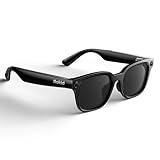
Overview: Rokid Ai Glasses Style reimagines smart eyewear as displayless assistant glasses, prioritizing real-time translation, AI interaction, and hands-free vlogging via a 12MP camera. Targeting travelers and outdoor creators, they function as sunglass-style companions without virtual screens.
What Makes It Stand Out: Revolutionary real-time translation (89 languages online, 6 offline) appears in your peripheral vision, while ChatGPT 5.2 integration offers contextual voice assistance. The 12MP Sony camera with EIS and ultra-light 38.5g frame redefine vlogging convenience, all wrapped in UV400-sunglass durability.
Value for Money: Priced as premium audio wearables, they justify cost through unique AI utility. Translation outperforms competitors, and the camera quality surpasses typical smart glasses. However, the lack of a display excludes movie/gaming use—value hinges entirely on productivity/translation needs.
Strengths and Weaknesses: Strengths: Industry-leading translation; lightweight comfort; superb vlogging camera; open-ear audio safety; IPX4 weather resistance. Weaknesses: Zero display functionality; offline translation limited to 6 languages; camera requires separate charging case; no screen anchoring for AR.
Bottom Line: A game-changer for travelers and creators needing discreet AI assistance, but irrelevant for virtual-screen seekers. Prioritize if translation/vlogging are critical; avoid if expecting traditional AR display capabilities.
6. Ray-Ban Meta (Gen 1), Wayfarer, Large Shiny Black | Smart AI Glasses for Men, Women — 12 MP Camera, Open-Ear Speakers for Audio, Video Recording and Bluetooth — Green Lenses — Wearable Technology

Overview: Ray-Ban Meta Gen 1 smart glasses merge iconic style with wearable tech, targeting lifestyle-focused users. Designed for hands-free capture and connectivity, they integrate a camera, audio, and Meta AI into a classic Wayfarer frame.
What Makes It Stand Out: The ultra-wide 12 MP camera and five-mic system enable seamless photo/video capture of your exact POV, while open-ear speakers maintain environmental awareness. Meta AI integration offers contextual suggestions and real-time answers, and the Shiny Black frame with Green Lenses ensures broad aesthetic appeal.
Value for Money: Positioned as a premium accessory, it justifies its cost through brand prestige, versatile functionality (social media streaming, calls, music), and discreet design. Though pricier than basic Bluetooth glasses, it outperforms niche alternatives in social integration and usability.
Strengths and Weaknesses: Strengths: Sleek, comfortable fit; intuitive voice commands (“Hey Meta”); excellent ambient audio balance; strong social media compatibility. Weaknesses: Battery life limited to ~4 hours for heavy use; AI features require Meta account; green lenses may not suit all lighting.
Bottom Line: Ideal for tech-savvy social users prioritizing style and hands-free content creation; less practical for all-day wear or those avoiding Meta’s ecosystem.
7. Diydeg AR Glasses, 4K HD 3D IMAX Wearable VR Headset Smart Glasses for Video Display, Myopia Friendly Portable Augmented Reality for Watch, Stream & Game on PC/Tablet/Console

Overview: Diydeg AR Glasses deliver a portable cinema experience with 4K resolution, targeting travelers and entertainment seekers. They function as wearable displays for videos, games, and streaming, emphasizing comfort and visual immersion.
What Makes It Stand Out: A 70° field of view, 1000+ PPI clarity, and myopia correction (0–700°) cater to diverse users. The 4000mAh battery enables extended use, while low-blue-light certification reduces eye strain during prolonged sessions—key for travelers avoiding neck strain.
Value for Money: Affordable for dedicated AR cinema use, it competes well against pricier VR headsets. However, USB-wired phone dependency (no PC compatibility) limits versatility, making it best for mobile-only entertainment rather than full AR applications.
Strengths and Weaknesses: Strengths: Exceptional portability; myopia-friendly; comfortable for extended wear; strong eye protection. Weaknesses: Phone-tethered (no standalone use); limited field of view vs. high-end VR; no audio jack (relying on phone speakers).
Bottom Line: A solid budget pick for movie/game lovers needing a personal theater on the go, but constrained by phone reliance and niche functionality.
8. Oakley Meta HSTN, Black | Smart AI Glasses for Men, Women — Performance for Sports, Athletes — Camera, Audio, Video — 8 Hour Battery — 3K HD Resolution — Clear Lenses
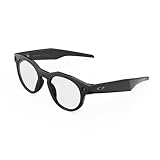
Overview: Oakley Meta HSTN targets athletes with performance-driven smart glasses, combining Meta AI integration with sport-specific durability. It emphasizes battery longevity and high-resolution capture for active lifestyles.
What Makes It Stand Out: An 8-hour battery (plus 48h via case) and 3K HD camera outperform rivals in endurance. Prizm lens options adapt to sports environments, while open-ear audio ensures situational awareness during activities like cycling or golf.
Value for Money: Premium pricing aligns with Oakley’s athletic reputation and extended battery. It’s cost-effective for serious athletes versus pro-grade action cams, though casual users may find it over-specified for basic audio/capture needs.
Strengths and Weaknesses: Strengths: Industry-leading battery; sport-optimized lenses; robust audio for calls/music; reliable Meta AI for real-time data (e.g., surf reports). Weaknesses: Bulky frame for non-athletes; limited color/lens choices; no myopia support.
Bottom Line: A top-tier choice for athletes needing durable, long-lasting smart glasses, but less versatile for everyday fashion or vision correction.
9. Fecoul Smart Bluetooth Glasses with AI Translation, 164 Languages Translator, with Speaker,Photochromic Lenses, TR90 Frame, 5H Battery Life, Open-Ear Audio for Men & Women, Driving,Travel&Work
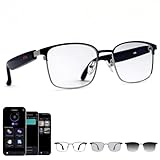
Overview: Fecoul glasses specialize in real-time translation and adaptive lenses, catering to global travelers and professionals. Its lightweight TR90 frame and photochromic lenses prioritize practicality across environments.
What Makes It Stand Out: Support for 164 languages (98% global coverage) via AI translation app sets it apart. Photochromic lenses auto-adjust from clear to tinted, while Bluetooth 5.4 ensures stable connectivity for calls/music during commutes or meetings.
Value for Money: Excellent for frequent travelers due to multi-language support and durable design. At mid-range pricing, it offers better translation depth than Ray-Ban/Oakley alternatives, though video capture is absent.
Strengths and Weaknesses: Strengths: Unmatched translation breadth; comfortable 32g frame; versatile photochromic lenses; 5-hour battery suffices for travel days. Weaknesses: No built-in camera; app-dependent translation; basic audio quality vs. premium rivals.
Bottom Line: Essential for multilingual travelers seeking discreet, functional smart glasses—skip if you prioritize photography or high-fidelity audio.
10. MNVOEQ AI Smart Wireless Bluetooth Translation Glasses for Men/Women with Speakers/Bluetooth&140+ Languages Translation Sports/Travel/Drive/Busniess (C1+AI+Color Change Lenses+Black)

Overview: MNVOEQ focuses on streamlined translation and style, targeting business travelers with one-click operation and glare-resistant lenses. It positions itself as a fashionable, all-in-one communication tool.
What Makes It Stand Out: 138+ language translation with “one-click start” simplifies operation. Color-changing lenses combat glare for driving, while integrated functions (calls, music, navigation) replace earbuds. The sleek black frame emphasizes tech-meets-fashion appeal.
Value for Money: Budget-friendly for core translation needs, but lacks the polish of Fecoul. Ideal for cost-conscious users prioritizing aesthetics over advanced features like photochromic precision or extended battery.
Strengths and Weaknesses: Strengths: Ultra-simple interface; stylish design; effective glare reduction; multi-scenario utility. Weaknesses: Translation accuracy may lag behind Fecoul; battery life unspecified (likely modest); no camera or AI context features.
Bottom Line: A stylish, entry-level option for basic translation and calls—opt for Fecoul if accuracy and lens adaptability are critical.
Understanding Modern Augmented Reality Smart Glasses
The term “smart glasses” encompasses a wide spectrum, but for AR enthusiasts, we’re specifically talking about devices designed to overlay digital information onto your real-world view in a persistent, contextually aware manner. Unlike basic notification displays or simple VR headsets, true AR glasses aim for a natural fusion of physical and digital, where virtual objects appear anchored to the real environment. This requires sophisticated sensors, powerful processing, and displays that don’t completely block out your surroundings. Recognizing this fundamental purpose is key to evaluating what features deserve your focus and budget.
Defining Your Primary Use Case
Before examining technical specifications, honestly assess how you intend to use the glasses daily. Will they be your primary work interface for complex 3D modeling, demanding high resolution and color accuracy? Are you focused on hands-free information access during physical tasks, prioritizing voice control and ruggedness? Or is social interaction and shared AR experiences your main goal, requiring excellent passthrough cameras and communication features? Your dominant use case dictates which features become non-negotiable and which can be deprioritized, saving you from paying for capabilities you won’t utilize.
Evaluating the Display Technology
The display is arguably the heart of the AR experience, directly impacting immersion and usability. Current 2026 technologies primarily involve waveguide optics (like diffractive or reflective waveguides) or free-space optics, each with trade-offs. Key factors include brightness (measured in nits), crucial for outdoor visibility; resolution (pixels per degree), affecting text clarity and detail; color gamut and accuracy for realistic overlays; and the all-important field of view (FoV), determining how much of your peripheral vision the digital content occupies. A narrow FoV creates a “screen in the sky” feeling, while a wider FoV enhances immersion but is significantly harder to engineer.
Field of View Considerations
A wider field of view (typically measured diagonally) allows digital content to extend further into your natural peripheral vision, making interactions feel less constrained and more integrated with your environment. While early devices offered FoVs around 30-40 degrees, newer models are pushing towards 50-60 degrees. However, a larger FoV often comes with compromises in brightness, weight, or cost. Consider if your primary tasks (like detailed design work vs. receiving navigation cues) truly benefit from an expanded FoV or if a slightly narrower, brighter display would serve you better.
Brightness and Outdoor Performance
Using AR glasses outdoors under direct sunlight is one of the toughest challenges. Displays need exceptionally high peak brightness (well over 1000 nits, ideally 2000+) to remain visible against ambient light without washing out. Look for devices with dynamic brightness adjustment and robust anti-glare coatings. Poor outdoor visibility severely limits the practicality of AR glasses for many real-world scenarios, turning a potential productivity tool into an indoor-only novelty.
The Critical Role of Comfort and Design
No matter how advanced the technology, if the glasses are uncomfortable, heavy, or draw unwanted attention, you simply won’t wear them consistently. Comfort is paramount for sustained use, especially for enthusiasts planning all-day wear. This encompasses weight distribution (aiming for under 80 grams is ideal), balanced ergonomics that don’t pinch or slip, adjustable nose pads, and temple designs that distribute pressure evenly. Materials matter too – lightweight titanium or advanced polymers are common in premium models.
Form Factor and Social Acceptability
The design must also fit into your life socially and professionally. Bulky, visor-like designs might offer superior performance but can be socially isolating or inappropriate in many settings. Sleeker, more eyeglass-like profiles are increasingly common, often resembling conventional prescription frames. Consider where and when you’ll use them: Do you need something discreet for office meetings, or is a more robust design acceptable for field work? The trend is strongly towards consumer-friendly aesthetics without sacrificing core functionality.
Weight Distribution Techniques
Manufacturers employ various strategies to minimize the “front-heavy” feel that plagued early AR glasses. This includes moving batteries to the temples or rear strap (though integrated is preferred), using ultra-lightweight frame materials, and optimizing the center of gravity. Try to find detailed reviews or, ideally, hands-on time to assess how the weight feels during extended wear, as specifications alone don’t convey the lived experience.
Processing Power and Onboard Intelligence
Modern AR glasses are sophisticated computers you wear on your face, demanding significant processing muscle. This isn’t just about running apps; it’s about real-time sensor fusion (combining data from cameras, IMUs, depth sensors, GPS), complex spatial mapping, object recognition, and rendering graphics seamlessly onto the real world – all with minimal latency. Look for dedicated AI accelerators (NPUs) alongside the main CPU/GPU, as they handle critical tasks like scene understanding and hand tracking efficiently, preserving battery life.
Sensor Suite Capabilities
The quality and quantity of sensors directly determine how well the glasses understand and interact with your environment. Essential sensors include:
- High-Resolution RGB Cameras: For video passthrough, object recognition, and environmental scanning.
- Depth Sensors (e.g., ToF, Stereo): Crucial for accurate spatial mapping, occlusion (virtual objects hiding behind real ones), and gesture recognition.
- Inertial Measurement Units (IMUs): High-precision accelerometers and gyroscopes for tracking head movement and orientation.
- Eye Tracking Sensors: Enabling foveated rendering (sharper graphics where you look), intuitive menu navigation, and advanced interaction.
- Microphones: An array for clear voice commands and spatial audio capture.
More advanced sensor suites enable richer interactions and more stable AR experiences but increase cost and power consumption.
Spatial Mapping and Environmental Understanding
This is where the glasses build a real-time 3D model of your surroundings. Advanced spatial computing allows virtual objects to persist in place, interact realistically with physical surfaces (like a virtual ball bouncing off your real table), and understand room layouts. The speed, accuracy, and persistence of this mapping are vital for professional applications and complex gaming. Evaluate how well a device handles dynamic environments and maintains spatial anchors over time.
Battery Life and Power Management
Battery life remains one of the most significant practical limitations for AR glasses. Continuous display use, sensor operation, and processing consume substantial power. Realistic expectations for active AR use in 2026 range from 2 to 4 hours for high-intensity tasks (like gaming or complex overlays), potentially extending to 6+ hours for lighter notification-focused use. Pay close attention to how battery life is measured – “up to” claims often reflect minimal usage scenarios. Integrated batteries are preferable to bulky external packs, but charging solutions (like fast charging or companion cases) are increasingly important.
Thermal Management Strategies
Intense processing generates heat, which is uncomfortable when worn directly on the face. Effective thermal management is non-negotiable. Look for devices utilizing passive cooling (heat spreaders, thermal interface materials), active cooling (miniature fans – less common due to noise), or intelligent thermal throttling that maintains performance without causing discomfort. Poor thermal design leads to reduced performance and shortens session times.
Connectivity and Ecosystem Integration
Seamless connectivity is vital for a useful AR experience. Essential wireless technologies include Wi-Fi 6E/7 for high-bandwidth data transfer (e.g., streaming complex 3D models), Bluetooth 5.3+ for peripherals like earbuds or controllers, and increasingly, direct cellular connectivity (5G/6G) for true untethered operation away from Wi-Fi. Low-latency connections are critical for responsive interactions, especially in collaborative AR scenarios. Consider how the glasses integrate with your existing ecosystem – smartphone companion apps are common, but deeper OS-level integration (e.g., with major mobile or desktop platforms) can significantly enhance functionality and streamline workflows.
The Importance of Developer Support
A thriving app ecosystem is what transforms hardware into a truly valuable platform. Investigate the maturity and openness of the developer platform. Are there robust SDKs (Software Development Kits) and APIs? Is there active community engagement and support from the manufacturer? A device with slightly older specs but a vibrant developer scene offering innovative, well-supported applications will likely provide a far richer and more sustainable experience than a technically superior device with a barren app store. Check the availability of apps relevant to your specific interests.
Audio Experience and Privacy
Audio is a fundamental, often underestimated, component of AR. Spatial audio – where sound appears to originate from specific locations in your environment – is crucial for immersion and understanding directional cues (like an alert coming from your virtual dashboard on the left). High-quality, discreet audio delivery is essential. Most modern glasses use bone conduction or open-ear (near-field) speakers to keep your ears aware of ambient sounds for safety and situational awareness, while still delivering clear audio. Evaluate the clarity, volume range, and privacy of the audio solution – you don’t want others constantly overhearing your notifications.
Microphone Array Performance
Clear voice input is key for control, especially when your hands are busy. A sophisticated multi-microphone array with advanced noise cancellation is necessary to isolate your voice from background chatter, wind, or traffic noise. Test reviews focusing on voice command accuracy in real-world environments. Poor microphone performance renders voice control frustrating and unreliable, significantly hampering the user experience.
Prescription Lens Compatibility
For the vast majority of potential users who require vision correction, seamless integration with prescription lenses is not a luxury, it’s a requirement. Evaluate the options: some manufacturers offer custom prescription inserts or full-frame builds, while others partner with optical labs. Consider the cost, lead time, and optical quality of the prescription solution. Clunky add-ons that compromise the device’s weight, balance, or field of view should be avoided. True mass adoption hinges on solving this elegantly.
Privacy and Security Implications
Wearable cameras and microphones raise legitimate privacy concerns, both for the user and those around them. Understand the device’s privacy features: Are there clear physical indicators (like an LED) when recording is active? Can sensors be easily disabled? How is data processed and stored – locally on the device or in the cloud? Robust security protocols are essential to prevent unauthorized access to your visual and auditory feed. Responsible manufacturers prioritize transparent privacy controls and clear user education about data handling.
Social Etiquette and Norms
Beyond technical privacy, consider the social context. Wearing glasses with visible cameras can make others uncomfortable. Be mindful of cultural and situational norms. Many venues (restaurants, theaters, private homes) may have policies against recording devices. Developing personal etiquette – asking permission, avoiding recording in sensitive situations, being transparent about usage – is crucial for the wider acceptance of AR technology. Choose devices with discreet designs and clear user-controlled privacy indicators to help navigate these social landscapes.
Future-Proofing Your Investment
AR technology is advancing rapidly. When investing in a high-end device, consider its potential longevity. Look for signs of future-proofing: modular designs allowing for sensor or display upgrades (still rare but emerging), manufacturer commitments to long-term software updates (3+ years is becoming a benchmark), and compatibility with emerging standards (like OpenXR for cross-platform AR/VR development). While no device will stay cutting-edge forever, choosing one with a clear update path and adaptable architecture maximizes its useful lifespan.
Software Update Commitment
The hardware is just the foundation; the software defines the evolving experience. Research the manufacturer’s track record for delivering timely, substantial operating system and feature updates. Frequent updates often bring performance improvements, new capabilities, security patches, and compatibility with the latest applications. A company known for abandoning devices after a year or two severely limits the long-term value of your purchase, regardless of initial hardware prowess.
## Frequently Asked Questions
How important is field of view (FoV) for everyday AR use?
While a wider FoV enhances immersion, its criticality depends on your use case. For navigation cues or basic notifications, a moderate FoV (40-50 degrees) is often sufficient. However, for immersive gaming, detailed design work, or complex spatial interactions, a wider FoV (50+ degrees) becomes significantly more valuable for a natural experience.
Can I realistically use AR glasses outdoors in sunlight?
Yes, but it depends heavily on display brightness. Look for devices boasting peak brightness of at least 1500-2000+ nits. Lower brightness models will struggle significantly in direct sunlight, making content hard to see. Anti-reflective coatings also play a crucial role in outdoor visibility.
How long does the battery typically last during active AR use?
Expect 2-4 hours for intensive tasks like gaming or complex overlays. Lighter usage, such as receiving notifications and occasional navigation, might extend this to 5-6 hours. Always prioritize reviews testing real-world usage over manufacturer “up to” claims, which often reflect minimal scenarios.
Are prescription lenses easily integrated?
Integration varies significantly. Some brands offer custom prescription inserts or full-frame builds directly, while others rely on third-party adapters. Evaluate the cost, optical quality, impact on weight/balance, and availability before purchasing if you require vision correction.
What sensors are absolutely essential for a good AR experience?
At minimum, high-resolution cameras, precise IMUs (gyro/accelerometer), and depth sensors are crucial for basic spatial understanding and tracking. Eye tracking and advanced environmental sensors significantly enhance interaction and realism but are becoming more common in enthusiast-focused models.
How do I address privacy concerns with wearable cameras?
Look for devices with clear physical indicators (like an LED) when cameras are active, easy-to-access physical shutters or software toggles to disable sensors, and transparent data policies. Always be mindful of social etiquette, ask permission when recording others, and avoid sensitive locations.
Is voice control reliable enough for primary interaction?
Voice control reliability has improved dramatically with advanced noise cancellation and AI processing. It’s generally very effective for core commands and hands-free operation in moderate environments, but may struggle in very noisy settings. Most devices also offer supplementary input methods like gestures or companion apps.
What operating system should I look for?
There’s no single “best” OS yet. Focus on the ecosystem and developer support. Platforms with robust SDKs, active developer communities, and strong manufacturer commitment to updates will offer more applications and longevity, regardless of the underlying OS name.
How comfortable are modern AR glasses for all-day wear?
Comfort has improved significantly, with many premium models now under 80 grams and designed like conventional glasses. However, extended wear comfort is highly individual. Prioritize trying them on if possible, paying attention to weight distribution, nose pad pressure, and temple fit over several hours.
Will my AR glasses become obsolete quickly?
The pace of innovation is fast, but focus on future-proofing elements: manufacturers committed to 3+ years of software updates, modular designs (where available), and compatibility with open standards like OpenXR can significantly extend a device’s useful lifespan beyond the initial hardware capabilities.
See Also
- Best Augmented Reality Glasses for Developers: 10 Expert Picks for 2026
- 10 Premium Augmented Reality Glasses for Enterprise Use (Worth the Investment)
- 10 Best Value Augmented Reality Glasses for Home Use in 2026
- 10 Premium Augmented Reality Glasses for Designers (Worth the Investment)
- 10 Best Augmented Reality Glasses for Immersive Learning in 2026