Table of Contents
Gaming has evolved far beyond the couch and the TV screen. Today’s immersive experiences pull players into vibrant digital worlds where every glance and gesture matters. Wearable displays represent the bleeding edge of this transformation, merging the physical and virtual in ways that were pure science fiction just a decade ago. For gamers craving deeper engagement, these devices aren’t just accessories—they’re gateways to entirely new dimensions of play, promising unparalleled presence and interactivity. But with rapid advancements and a flood of technical jargon, navigating this space can feel overwhelming. Where do you even begin when every spec sheet reads like an engineering manual?
The allure is undeniable: imagine dodging virtual obstacles in your living room, exploring alien landscapes that feel tangibly real, or collaborating with teammates in a shared digital space as if they were standing beside you. Yet, the wrong choice can lead to discomfort, frustration, or a jarring disconnect that snaps you right back to reality. This isn’t about chasing the flashiest gadget; it’s about finding a seamless extension of your gaming self. Understanding the core technologies, ergonomic essentials, and compatibility factors is crucial to unlocking true immersion without buyer’s remorse. Let’s cut through the hype and focus on what actually matters for your next-level setup.
Top 10 Wearable Displays for Gaming
Detailed Product Reviews
1. RayNeo Air 3s AR/XR Glasses, 201" at 6m, 120Hz FHD HueView Display, Portable AR Video Eyewear Gaming Glasses for iPhone 17/16/15, Android, Mac, Switch, PS5, Steam Deck - 3S-Silver

Overview:
The RayNeo Air 3s delivers a portable 201-inch virtual screen experience via advanced AR/XR glasses, targeting gamers and media consumers seeking immersive, private viewing. Compatible with major platforms including iOS, Android, and gaming consoles, it emphasizes visual fidelity and eye comfort for extended use.
What Makes It Stand Out:
RayNeo’s proprietary HueView display boasts exceptional 98% DCI-P3 coverage, ΔE <2 color accuracy, and infinite contrast, rivaling premium monitors. The exclusive OptiCare system—featuring 3840Hz dimming and TÜV-certified low blue light—minimizes eye strain. A dual opposing acoustic chamber design also provides superior, spatial audio uncommon in this category.
Value for Money:
Priced competitively against rivals, the Air 3s justifies its cost with class-leading color science, robust eye protection, and versatile device compatibility. While not the cheapest, its focus on long-term comfort and cinematic quality offers tangible ROI for frequent users over basic alternatives.
Strengths and Weaknesses:
Strengths: Unmatched color accuracy and contrast; best-in-class eye comfort features; immersive 120Hz refresh rate; exceptional audio design; broad device support.
Weaknesses: Requires 10-minute breaks every 30 minutes per comfort advisory; no native prescription support; slightly heavier than some competitors.
Bottom Line:
An elite choice for visual purists prioritizing eye health and cinematic immersion, the RayNeo Air 3s excels despite minor usage limitations. Highly recommended for serious media consumption and gaming.
2. Rokid Max 2 AR Glasses Black, 215" Micro-OLED Display, 50° FOV, 600 Nits Brightness, Compatible with Smart Phone, Steam Deck, ROG, and More, Immersive Wearable Display for Gaming & Entertainment

Overview:
Rokid Max 2 Black offers a 215-inch virtual display via Micro-OLED panels, targeting gamers and travelers. It connects directly to USB-C devices without batteries, emphasizing plug-and-play simplicity for smartphones, laptops, and handheld consoles like Steam Deck.
What Makes It Stand Out:
Its 50° field of view (FOV) is among the widest in class, enhancing immersion, while 600 nits brightness ensures usability in varied lighting. The airy nose pad design prevents slippage and fatigue, and the integrated myopia dial (up to -6D) caters to common vision needs without extra lenses.
Value for Money:
As a cable-powered solution, it avoids battery degradation costs. The wide FOV and brightness justify its positioning, though limited vision correction (no astigmatism support) may deter some. Competitively priced for its display scale and comfort innovations.
Strengths and Weaknesses:
Strengths: Industry-leading 50° FOV; high 600-nit brightness; comfortable, non-slip nose pads; useful built-in myopia adjustment; no internal battery required.
Weaknesses: No astigmatism/presbyopia support; prescription users over -6D need custom lenses; slightly bulky frame.
Bottom Line:
Ideal for gamers and travelers needing a bright, wide-field display with physical comfort, the Rokid Max 2 Black delivers strong value. Recommended for myopic users within its diopter range.
3. AOC Air Mega AR/XR Glasses - 201’’ Micro-OLED Personal Wearable Monitor for Gaming & Movies, FHD 120Hz Plug-and-Play Display Legion Go & USB-C Devices, High-Fidelity Audio & Privacy

Overview:
AOC Air Mega provides a 201-inch FHD wearable display using Micro-OLED tech, designed for plug-and-play gaming and media. It targets users seeking privacy and portability across USB-C devices, from laptops to handheld consoles.
What Makes It Stand Out:
True plug-and-play functionality via USB-C (DP Alt Mode) eliminates software hassles, working instantly as a secondary monitor. The high-fidelity audio and privacy-focused design—keeping content visible only to the wearer—are key differentiators for public use.
Value for Money:
While lacking unique visual specs, its universal compatibility and zero-setup convenience offer solid value for casual users. Priced accessibly, it’s a practical entry point compared to feature-heavy (but pricier) rivals like RayNeo.
Strengths and Weaknesses:
Strengths: Effortless plug-and-play setup; broad USB-C/DP Alt Mode compatibility; excellent privacy; portable design with carry case; comfortable adjustable nose pads.
Weaknesses: No standout display specs (e.g., FOV/brightness unlisted); audio quality unspecified; no vision correction features.
Bottom Line:
A reliable, no-fuss solution for on-the-go viewing where simplicity and privacy matter most. Best for casual users prioritizing ease of use over cutting-edge immersion.
4. Lenovo Legion Glasses Gen 2 - Micro-OLED Personal Wearable Monitor for Gaming & Movies, FHD 120Hz Plug-and-Play Display for Lenovo Legion Go & USB-C Devices, High-Fidelity Audio & Privacy

Overview:
Lenovo’s Legion Glasses Gen 2 delivers a 201-inch FHD experience via Micro-OLED, optimized for gaming on Legion Go and other USB-C devices. It blends portability with high-fidelity audio for immersive entertainment.
What Makes It Stand Out:
Beyond plug-and-play USB-C connectivity, it includes a prescription lens frame (lenses sold separately), a rarity in this segment. Compatibility with Legion Go, Steam Deck, and Macs broadens its appeal, while the included carry case enhances portability.
Value for Money:
Slightly premium-priced, it justifies cost with the prescription-ready design—a boon for glasses wearers. The bundled accessories and Legion ecosystem integration add tangible value over near-identical competitors like AOC.
Strengths and Weaknesses:
Strengths: Prescription lens frame support; seamless plug-and-play; Legion Go optimization; high-fidelity audio; travel-friendly with case.
Weaknesses: No advanced display specs detailed; limited vision correction without third-party lenses; similar core tech to AOC model.
Bottom Line:
A top pick for prescription users and Legion Go owners, offering thoughtful extras that elevate it above basic plug-and-play rivals. Recommended for gamers needing customization.
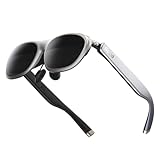
5. Rokid Max 2 AR Glasses Silver, 215" Micro-OLED Display, 50° FOV, 600 Nits Brightness, Compatible with Mobile Phone, Steam Deck, ROG, Ipad, Mac Immersive Wearable Display for Gaming & Entertainment
Overview:
The silver variant of Rokid Max 2 mirrors the black model’s core specs: a 215-inch virtual display, 50° FOV, and USB-C power. It targets iOS/Android users and gamers seeking a bright, comfortable wearable screen.
What Makes It Stand Out:
Identical to Product 2 in functionality, its silver finish offers aesthetic versatility. The standout features remain the expansive 50° FOV, 600-nit brightness for daylight use, and ergonomic nose pads that reduce fatigue during extended sessions.
Value for Money:
Priced the same as the black model, it provides identical value—ideal for users preferring a metallic look. The FOV and brightness edge over competitors like AOC/Lenovo make it compelling for immersive gaming at this tier.
Strengths and Weaknesses:
Strengths: Same as Product 2: wide 50° FOV; high brightness; comfortable fit; myopia dial; cable-powered reliability.
Weaknesses: Same as Product 2: no astigmatism support; limited high-prescription options; premium color variant adds no functional upgrades.
Bottom Line:
Functionally identical to the black version, this silver edition is purely cosmetic. Choose based on preference; otherwise, it’s equally recommended for gamers valuing field of view and comfort.
6. Rokid AR Joy Pack 2 AR Glasses, Smart Glasses Max 2 with Station, 160" Micro-OLED Display, Google Play, Media Streaming, HDCP Support & Cloud Gaming, Console, Android, Windows Compatible

Overview: The Rokid AR Joy Pack 2 delivers a portable augmented reality entertainment hub, pairing Google-certified Android TV Station hardware with Micro-OLED AR glasses for a virtual 215-inch screen experience. It targets media consumers seeking immersive viewing without traditional displays. What Makes It Stand Out: As the world’s first Google-certified AR system, it uniquely integrates seamless HDCP plug-and-play connectivity and access to Google Play’s vast app ecosystem. The 50° FOV, 120Hz refresh rate, and 600 nits brightness ensure smooth, vivid visuals, while the compact Station eliminates streaming box clutter. Value for Money: Priced competitively for premium AR, it justifies cost through versatile functionality (gaming, streaming, productivity) and future-proof Google certification. However, the lack of Netflix support slightly diminishes value versus standalone streamers. Strengths and Weaknesses: Pros: Google TV integration, exceptional brightness/refresh rate, HDCP simplicity, portable Station. Cons: No Netflix, limited to single-screen mode on some Android devices, Station adds bulk. Bottom Line: An innovative entry for AR entertainment with standout Google certification and display quality, ideal for tech enthusiasts—despite minor app limitations—earning a strong recommendation for immersive media on the go.
7. RayNeo Air 3s Pro AR/XR Glasses, 201" 120Hz FHD HueView Display, Portable AR Video Eyewear Gaming Glasses for iPhone 16/15/17, Android, Mac, Switch, PS5, Steam Deck - Next-Gen Wearable Theater

Overview: RayNeo Air 3s Pro offers a versatile wearable theater experience with a 201-inch virtual display, targeting users needing privacy-focused, high-quality media consumption across devices like iPhones, consoles, and PCs in bright environments. What Makes It Stand Out: Its OptiCare tech (3840Hz hybrid dimming, TÜV-certified low blue light) ensures exceptional eye comfort during extended use. Unique Whisper Mode 2.0 minimizes audio leakage, while 99.6% ambient light blocking enables viewing anywhere—key differentiators for public or shared spaces. Value for Money: At its price point, the Air 3s Pro excels with multi-device compatibility (iPhone, PS5, Steam Deck), no-app-required mode switching, and superior privacy features. It outperforms rivals in comfort and real-world usability, justifying the investment for frequent travelers or office users. Strengths and Weaknesses: Pros: Best-in-class eye comfort, effective audio privacy, ambient light rejection, plug-and-play versatility. Cons: Limited to FHD resolution, no prescription lens support, slightly bulky temple design. Bottom Line: A top choice for privacy-conscious users seeking fatigue-free, immersive viewing in dynamic environments—the OptiCare tech and Whisper Mode make it a standout value for daily commuters and professionals.
8. Rokid AR Spatial Black- Max2 AR Glasses & Station2 Spatial Computer with 360" Micro-OLED 3-Screen Display, 120Hz OLED, 600 Nits, Multi-Tasking for Work & Gaming

Overview: Rokid Spatial Black combines Max2 AR glasses with Station2 to create a productivity-focused spatial computing system, featuring a groundbreaking triple virtual screen setup ideal for multitasking, gaming, and immersive work sessions. What Makes It Stand Out: The unique 3-screen multitasking capability—adjustable in size, aspect ratio (up to 32:9), and mode (Reading, Sports, etc.)—sets it apart. 3DoF functionality in key modes anchors displays in space, while Micro-OLED clarity (1920×1200, 600 nits) ensures professional-grade visuals. Value for Money: Premium pricing is justified for professionals needing spatial workflows, though casual users may find it excessive. The Station2 integration and multi-screen flexibility offer superior ROI versus single-screen AR glasses, especially for developers or analysts. Strengths and Weaknesses: Pros: Revolutionary 3-screen workflow, 3DoF stability, high brightness/color accuracy, myopia support. Cons: Android multi-screen limited to DLNA, some apps lack aspect-ratio support, Station2 required for full features. Bottom Line: A niche powerhouse for productivity enthusiasts and spatial computing adopters—the 3-screen innovation makes it indispensable for work-focused AR, despite minor Android limitations.
9. ASUS AirVision M1 Smart AR Glasses - 100" Micro-OLED Wearable Display, 1100 nits, Multi-Screen, Speakers, USB-C, Magnetic Shade, Designed for ROG Ally/Steam Deck/PC/iPhone 16/15/Android/Mac/Tablet

Overview: ASUS AirVision M1 prioritizes portability and brightness for a wearable display experience, targeting gamers and mobile professionals with its ultra-light design and seamless compatibility across devices like ROG Ally and Steam Deck. What Makes It Stand Out: Unmatched 1,100 nits brightness enables outdoor usability rare in AR glasses, while the 95% DCI-P3 color gamut delivers cinematic vibrancy. The magnetic shade, 87g weight, and integrated audio/mic create a uniquely travel-friendly package. Value for Money: Priced mid-to-high, it offers excellent value for gamers via ROG Ally integration and professionals needing bright, portable multi-screen setups. Competitors often lack its brightness or cross-device ease, though the 100-inch screen is smaller than rivals. Strengths and Weaknesses: Pros: Industry-leading brightness, featherlight build, versatile USB-C connectivity, built-in audio. Cons: Smaller virtual screen (100"), limited FOV, no auto-IPD adjustment. Bottom Line: The go-to for gamers and travelers needing extreme portability and sunlight visibility—its brightness and Ally synergy make it a compelling buy despite the modest screen size.
10. GOOVIS Art XR Head Mounted Display – 110’’ FHD Micro-OLED Video Display, Lightweight & Compact, Open-View for Multitasking, Works with PC/iPhone16/Android/Gaming Consoles/Handhelds (Black)

Overview: GOOVIS Art redefines XR with an “open-view” design preserving peripheral vision, targeting professionals and creatives who require seamless real-world interaction alongside high-fidelity virtual displays for multitasking. What Makes It Stand Out: Its open-view architecture uniquely enables true multitasking—viewing digital content while navigating physical spaces. Coupled with DSLR-grade optics (4,496PPI clarity, <1% distortion) and 110g portability, it solves the isolation problem of traditional XR. Value for Money: Premium pricing is warranted for its unparalleled multitasking capability and optical precision. While pricier than basic AR glasses, the ergonomic design and real-world usability deliver superior ROI for designers or field technicians. Strengths and Weaknesses: Pros: Revolutionary open-view for situational awareness, exceptional optical clarity, lightweight/foldable, all-environment performance. Cons: Lower brightness (vs. ASUS), no audio leakage protection, niche appeal for pure entertainment. Bottom Line: An essential tool for hands-on professionals needing contextual awareness—the open-view innovation makes it unmatched for work-centric XR, though casual users may prefer immersive alternatives.
Understanding Wearable Display Technology for Gamers
How Resolution Impacts Your Visual Fidelity
Resolution directly shapes how crisp and believable your virtual environment appears. Higher pixel density minimizes the “screen door effect,” where visible gaps between pixels break immersion. Gamers should prioritize devices offering at least 1920x1080 per eye for mainstream titles, while competitive or visually intensive experiences often benefit significantly from quad HD or beyond. Remember, raw numbers alone aren’t the full story—optical quality and software rendering play equally vital roles in delivering a smooth, lifelike picture without eye strain during extended sessions.
Refresh Rates and Motion Smoothness
A high refresh rate is non-negotiable for responsive, nausea-free gameplay. Standard displays often run at 60Hz, but wearable displays targeting gamers typically start at 90Hz, with premium options pushing 120Hz or higher. This reduces motion blur and latency, making fast-paced action feel snappier and more natural. Consider your primary game genres; rhythm games or competitive shooters demand the highest possible rates, while slower-paced adventures might be forgiving at lower thresholds. Always verify the sustained refresh rate under load, not just peak specs.
Field of View: Expanding Your Peripheral Awareness
Your field of view (FoV) determines how much of the virtual world you can see at once without moving your head. A narrow FoV creates a tunnel-vision effect, diminishing immersion and potentially causing disorientation. Look for devices offering a horizontal FoV of 100 degrees or wider for a truly encompassing experience. Wider FoVs enhance spatial awareness in open-world games and make environmental storytelling more impactful, though they often require more powerful hardware to render effectively.
Prioritizing Comfort and Ergonomics
Weight Distribution and Long-Session Endurance
Even the most advanced display becomes unusable if it causes neck fatigue after twenty minutes. Optimal weight distribution—balancing mass between the front display unit and rear counterweights—is critical. Aim for sub-500g total weight where possible, but pay closer attention to how that weight feels across your face and head. Adjustable straps, cushioned facial interfaces, and modular designs that allow swapping components can make a dramatic difference during marathon gaming sessions.
Facial Interface Materials and Breathability
The material touching your skin directly impacts comfort, especially during intense play. Memory foam interfaces offer plush cushioning but can trap heat, while silicone or hybrid materials improve airflow but might feel less forgiving. Look for removable, washable face pads to maintain hygiene. Ventilation channels around the eyes and nose area are essential to prevent fogging and overheating, turning what could be a sweaty distraction into a barely noticeable part of your gear.
Adjustability for Diverse Head Shapes
One-size-fits-all rarely fits anyone perfectly. Seek devices with multi-axis adjustment: vertical slide mechanisms for eye height, interpupillary distance (IPD) sliders to match your unique eye spacing, and tension controls for the head strap. Proper IPD alignment is crucial—it prevents blurry vision and eye strain by ensuring the lenses focus correctly for your physiology. Test adjustability range specifications against your measurements before committing.
Connectivity and System Requirements
Wired vs. Wireless: Trade-offs in Performance
Wired connections (like USB-C or DisplayPort) typically deliver the lowest latency and highest bandwidth, essential for graphically demanding PCVR titles. Wireless options (using Wi-Fi 6E or proprietary links) offer unparalleled freedom of movement but may introduce compression artifacts or occasional lag spikes. Consider your playstyle: tethered setups suit stationary high-fidelity gaming, while wireless excels for room-scale adventures or casual use. Some systems offer both modes for flexibility.
Minimum Hardware Specifications for Smooth Gameplay
Don’t assume your current gaming rig can handle a wearable display. These devices place immense demands on GPUs, often requiring high-end cards to render two high-resolution views simultaneously at rapid refresh rates. Check manufacturer-recommended specs meticulously—not just the “minimum.” Underspec’d hardware leads to stuttering, motion sickness, and ruined immersion. Factor in CPU requirements too, as physics calculations and AI in complex worlds also strain processing power.
Compatibility with Existing Gaming Platforms
Verify seamless integration with your primary ecosystem. Does it natively support your PC via SteamVR or Oculus software? Can it link directly to your console, or is a separate adapter needed? Some displays work best within specific storefronts or require particular operating systems. Cross-platform flexibility future-proofs your investment, especially if you switch between PC, standalone, or console-based gaming. Check controller compatibility too—some systems mandate proprietary peripherals.
Audio Integration Essentials
Built-in vs. External Audio Solutions
Audio is half the immersion equation. Many wearable displays feature integrated spatial audio drivers positioned near the ears, offering convenience and decent positional cues. However, audiophiles or competitive gamers often prefer high-quality external headphones for superior soundstage and noise isolation. Check if the device has a standard 3.5mm jack or Bluetooth support for easy pairing. Built-in solutions save setup time but may compromise on audio fidelity compared to dedicated gaming headsets.
Spatial Audio and 3D Sound Positioning
True spatial audio renders sound as if it originates from specific points in 3D space—crucial for pinpointing enemy footsteps or environmental effects. Ensure the display either natively supports advanced spatial audio standards (like Dolby Atmos for Headphones) or integrates smoothly with your existing spatial audio software. This isn’t just about volume; it’s about directional accuracy that enhances situational awareness and deepens emotional engagement in-game.
Battery Life and Power Management
Real-World Usage Expectations
Manufacturer battery claims often reflect ideal conditions, not intense gaming sessions. Expect 1.5-2 hours of continuous play for standalone units under heavy load. If you’re tethered to a PC, battery life becomes irrelevant, but standalone convenience comes with power trade-offs. Consider removable/swappable batteries for extended play without recharging downtime, or models that support passthrough charging (playing while plugged in without degrading the battery).
Thermal Management During Extended Sessions
Pushing graphics hard generates significant heat inside a sealed headset. Effective thermal design—using heat pipes, vapor chambers, or strategic ventilation—prevents overheating that can throttle performance or cause discomfort. Check user reviews specifically mentioning heat buildup after 45+ minutes of play. Overheating not only affects hardware longevity but can also fog lenses and distract from your game.
Safety and Accessibility Features
Guardian Systems and Play Area Boundaries
Robust guardian systems are vital for physical safety. These map your play space and create virtual boundaries, alerting you before you collide with real-world furniture. Look for systems offering multi-zone boundary definitions, dynamic recalibration as you move, and clear visual/audio warnings. Customizable boundary colors and hysteresis settings (how close you can get before triggering) prevent unnecessary interruptions while keeping you safe.
Accessibility Options for Diverse Gamers
True immersion means inclusivity. Investigate features like adjustable text sizes, colorblind modes, one-handed controller support, and remappable inputs. Some displays offer seated-mode optimization for limited mobility, while others provide vestibular comfort settings (like artificial horizons) to reduce motion sickness. Prioritize platforms with active accessibility communities and developer tools that encourage inclusive design.
Future-Proofing Your Investment
Software Update Roadmaps and Support Lifespan
Hardware evolves fast, but software updates can extend a device’s relevance. Research the manufacturer’s track record: Do they provide regular OS and feature updates years after launch? Are they committed to backward compatibility? A device with strong ongoing software support gains new capabilities (like eye-tracking or improved passthrough) long after purchase, while neglected hardware becomes obsolete quickly.
Expandability Through Accessories and Add-ons
Consider what the ecosystem offers beyond the base unit. Are there official add-ons like prescription lens inserts, enhanced facial trackers, or modular controllers? Third-party accessory support (like magnetic face covers or ergonomic straps) also adds longevity. A platform with a thriving accessory market lets you tailor the experience as your needs evolve, protecting your investment against changing preferences.
Frequently Asked Questions
How do I determine the right interpupillary distance (IPD) setting for my wearable display?
Measure the distance between your pupils in millimeters using a ruler against a mirror or a specialized app. Most devices offer a physical slider or software adjustment; set it precisely to this measurement for optimal clarity and to avoid eye strain.
Can wearable displays cause motion sickness, and how can I prevent it?
Yes, especially with poor tracking or mismatched movement. Start with short sessions in comfortable environments, ensure high frame rates, use stationary gameplay modes if needed, and gradually increase exposure. Many devices offer comfort settings like vignettes or snap turning to minimize disorientation.
Are prescription lenses available for gaming wearable displays?
Many manufacturers sell official prescription lens kits that snap into the headset, or you can use third-party clip-on solutions. Some high-end models accommodate standard optical inserts. Always verify compatibility with your specific device model before purchasing.
What’s the difference between monochrome and full-color passthrough cameras?
Monochrome passthrough typically offers higher resolution and lower latency for basic obstacle avoidance, while full-color provides a more natural view of your surroundings but may be grainier or laggy. Full-color is better for mixed-reality apps, but monochrome often suffices for safety boundaries.
How important is inside-out vs. outside-in tracking for gaming?
Inside-out tracking (using cameras on the headset) is simpler to set up and more flexible for different spaces. Outside-in (using external sensors) generally offers superior precision and stability, especially for competitive play. Most modern standalone displays use advanced inside-out systems that rival older outside-in performance.
Can I use a wearable display with glasses?
Yes, but it depends on the headset’s eye relief (space between lenses and eyes). Look for models with adjustable eye relief or sufficient depth to accommodate most standard frames. Some displays even include glasses spacer pads for added comfort.
What causes the “screen door effect,” and how can I reduce it?
This grid-like pattern appears when you see gaps between pixels. Higher resolution displays minimize it, but proper optical calibration and adjusting the headset’s position on your face can also help. Avoid pressing the display too tightly against your eyes.
How do I clean my wearable display lenses safely?
Use only microfiber cloths designed for optics—never paper towels or clothing. Apply a small amount of专用 lens cleaning solution to the cloth, not directly on the lenses. Wipe gently in a circular motion from the center outward to avoid scratches.
Is wireless streaming from a PC to a standalone display reliable for gaming?
It can be, with the right setup. Requires a powerful router (Wi-Fi 6 recommended), minimal interference, and compatible software like Virtual Desktop or ALVR. Expect some latency increase compared to wired, making it less ideal for ultra-competitive titles but often sufficient for immersive single-player experiences.
What minimum internet speed do I need for cloud gaming on a wearable display?
For smooth 1080p cloud gaming, aim for a stable 25 Mbps connection with low latency (<40ms). 4K streaming may require 35-50 Mbps. Use a wired Ethernet connection for your router and prioritize 5GHz Wi-Fi bands for the display to minimize lag and buffering.
See Also
- Stop Eye Strain with the 10 Best Hands-Free Displays This Year
- We Tested 50 Wearable Displays - Here are the 10 Best for Content Creators
- We Tested 50 Wearable Displays - Here are the 10 Best for Field Technicians
- The 10 Best Wearable Displays for Outdoor Navigation in 2026
- The 10 Ultimate Best Wearable Displays for Content Creators in 2026