Table of Contents
Choosing the right tech for your child, especially something as personal as a wearable device used throughout the school day, can feel like navigating a digital minefield. Just a few years ago, the biggest debate was whether kids needed a watch at all; now, parents are weighing complex features against school rules, safety concerns, and the ever-present fear of distraction. The landscape for kids’ smartwatches is evolving rapidly, with 2026 bringing even more sophisticated options designed specifically for the school environment – but also introducing new questions about privacy, screen time, and what level of connectivity is truly appropriate between the classroom and home.
Gone are the days of simple step counters or basic chat functions. Today’s school-bound kids’ wearables promise enhanced safety features, stricter parental controls, and interfaces built to minimize classroom disruption. Yet, this progress brings its own set of challenges: Will the watch comply with your school’s updated tech policy? Can it last the entire school day plus after-school activities without dying? Most importantly, does it genuinely enhance your child’s safety and independence without becoming a source of anxiety or distraction? Understanding the key considerations for 2026 isn’t just about picking a gadget; it’s about making a thoughtful decision that supports your child’s well-being and learning experience within the specific context of modern school life.
Top 10 Kids Smartwatches for School
Detailed Product Reviews
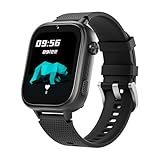
1. OKYUK Kids Smart Watch Gift for Girls Age 5-12, 4G Kids Watch 47 Games, HD Touch Screen Two-Way Calling Feature, School Settings, SOS, Birthday Gift for Boys and Girls Ages 7 8 9 10 (Black)
Overview:
This 4G-enabled smartwatch targets kids aged 5–12 with safety and entertainment as core pillars. Pre-loaded with 47 games and featuring two-way calling, SOS alerts, and school mode, it positions itself as an all-in-one gift for birthdays or holidays. The inclusion of a SIM card out of the box simplifies setup.
What Makes It Stand Out:
Its standout feature is the sheer volume of 47 educational games blending math and language puzzles, promoting cognitive development alongside fun. The braided strap, silicone case, and necklace lanyard offer durability and style appeal, while the SOS function (auto-dialing preset contacts after 3-second hold) provides critical safety. School mode effectively locks non-essential apps during class.
Value for Money:
Priced competitively for its feature set, it delivers strong value by bundling a SIM card and avoiding monthly fees. While alternatives like Cosmo require subscriptions, this watch eliminates ongoing costs, making it ideal for budget-conscious parents seeking basic connectivity and entertainment without long-term commitments.
Strengths and Weaknesses:
Strengths: Extensive game library for learning; no subscription needed; robust physical design; easy school mode activation.
Weaknesses: Short 6-hour gameplay battery life; GPS accuracy lags behind premium models; limited parental control granularity compared to subscription-based competitors.
Bottom Line:
A practical, affordable entry-level smartwatch for younger kids prioritizing fun and fundamental safety. Best for parents seeking a one-time purchase without subscriptions, though those needing advanced tracking should consider higher-end options.
2. JrTrack 5 Kids Smart Watch by Cosmo | Best Kid-Safe Phone Watch | Precision Real-Time GPS Tracking | Call, Text, Activity, School Settings | Spotify Music | Parental Controls | SOS & Safety Alerts

Overview:
Cosmo’s JrTrack 5 is a premium kids’ smartwatch emphasizing safety and connectivity for ages 6+. It combines real-time GPS tracking, secure calling/texting, and robust parental controls via a subscription-based cellular service, positioning itself as a comprehensive safety solution.
What Makes It Stand Out:
HaloGPS technology delivers industry-leading location accuracy, while True Texting enables secure photo/video messaging with approved contacts. The $9.99/month eSIM plan (included) covers unlimited calls/texts/data across North America, and Spotify integration adds unique entertainment value. Parental controls allow full message monitoring and contact vetting.
Value for Money:
Though the upfront cost is higher, the bundled cellular service (starting at $9.99/month) justifies the price. Competitors often charge more for similar coverage, and features like Spotify and military-grade security offer long-term utility. This is a worthwhile investment for parents prioritizing precision tracking and communication safety.
Strengths and Weaknesses:
Strengths: Unmatched GPS accuracy; secure messaging with media sharing; no spam/internet access; Spotify support; transparent subscription pricing.
Weaknesses: Mandatory $9.99/month fee; eSIM incompatible with other carriers; no built-in games for independent play.
Bottom Line:
The top choice for parents demanding elite safety features and seamless communication. Its subscription model pays off in reliability, making it ideal for families valuing precision tracking and content security over zero-cost operation.
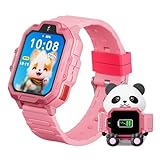
3. 4G Kids Smart Watch, T17 Smartwatch Gifts with Panda Holder, GPS Tracker, Video Calling, SOS, Voice Chat, SMS, School Mode, Puzzle Games, HD Touch Screen for Boys & Girls 3-12(Pink)
Overview:
The T17 smartwatch combines safety, education, and playful design for kids 3–12. Its standout accessory—a panda-shaped wireless charging dock—complements core features like 4G video calling, GPS tracking, and a reward-based behavior system, targeting parents seeking both functionality and charm.
What Makes It Stand Out:
The exclusive panda holder enables effortless wireless charging, eliminating cable clutter. Beyond standard SOS and geo-fencing, it includes a “hearts” reward system to incentivize positive behavior and seven educational puzzle games. The 1.83-inch HD screen and school mode auto-lock enhance usability during learning hours.
Value for Money:
Priced mid-range, it offers exceptional value with the bundled panda dock and no subscription requirement. While GPS accuracy trails Cosmo’s HaloGPS, the included charging solution and behavior-reward mechanics provide tangible daily utility that cheaper models lack, particularly for younger children.
Strengths and Weaknesses:
Strengths: Innovative wireless charging dock; engaging reward system; school mode auto-activation; 7 educational games; intuitive app setup.
Weaknesses: GPS less precise than premium rivals; no Spotify/music streaming; SIM card sold separately (adding cost).
Bottom Line:
An excellent pick for creative parents wanting to blend safety with positive reinforcement. The panda dock and reward features make it uniquely appealing for ages 5–10, though GPS-focused buyers might prefer subscription models.
4. 4G Kids Smart Watch GPS Tracker - Smartwatch with Two Way Call Video Calling 7 Puzzle Games Voice Chat SOS School Mode Pedometer Geo-Fence Touch Screen Alarm Clock Smartwatches for Boys Girls

Overview:
This no-frills 4G smartwatch delivers essential safety and communication tools for kids, including GPS tracking, video calls, and school mode. Designed as a screen-time alternative to smartphones, it targets cost-aware parents seeking basic connectivity without complex features.
What Makes It Stand Out:
It uniquely combines pedometer functionality with geo-fencing and a “Love Reward” system, encouraging physical activity alongside safety. The SeTracker 2 app enables family-wide group chats, and stranger rejection during school mode provides focused learning protection—key for younger users prone to distraction.
Value for Money:
As one of the most affordable 4G options, it offers solid value for core needs. However, the separate SIM card requirement (not included) adds unexpected cost, and regional restrictions (Americas only) limit versatility. It’s economical for basic use but lacks the polish of pricier rivals.
Strengths and Weaknesses:
Strengths: Budget-friendly; pedometer + geo-fence combo; effective school/stranger blocking; family group chats via app.
Weaknesses: SIM card not included; GPS accuracy inconsistent; no music/app ecosystem; choking hazard warning for under-3s.
Bottom Line:
A functional, entry-level option for parents needing fundamental tracking and calls on a tight budget. Avoid if seeking premium accuracy or extras, but suitable for straightforward safety monitoring in school-aged kids.
5. TickTalk 5 Kids Smart Watch with GPS Tracker, Voice & Video Calling, Texts, SOS & Parental Controls | Safe 4G LTE Smartwatch with Free Music, Reminders & School Mode for Boys & Girls Ages 3-12

Overview:
TickTalk 5 is a high-end 4G LTE smartwatch engineered for safety-first connectivity in kids 3–12. It excels in precise location tracking, end-to-end encrypted messaging, and robust parental oversight, targeting discerning families who prioritize security and performance.
What Makes It Stand Out:
SmartPin AI location correction (using Google Maps) delivers unmatched indoor/outdoor GPS accuracy, while SignalBooster technology ensures strong network coverage. Real SMS support, free Spotify music, and 100+ hour battery life differentiate it. Parental controls include T-Cloud backups and granular permission management.
Value for Money:
Priced at the premium tier, it justifies cost through superior tech: AI-enhanced GPS outperforms competitors, and free music/services eliminate extra fees. Though pricier upfront than OKYUK, its reliability and 3-year typical lifespan offer better long-term value than subscription-dependent models like Cosmo.
Strengths and Weaknesses:
Strengths: AI-powered location accuracy; 100+ hour battery; free Spotify/music; real SMS capability; military-grade encryption.
Weaknesses: Highest initial cost; app setup slightly complex; no physical games (relies on app ecosystem).
Bottom Line:
The ultimate investment for safety-conscious families. Its AI tracking, battery life, and security features set a new standard, making it worth the premium for parents who demand the most reliable, feature-rich kids’ smartwatch available.
6. Smart Watch for Kids, 1.85" Fitness Tracker with Heart Rate, Sleep Monitor, IP68 Waterproof Smartwatches with Video Music, Pedometer, Game, NO APP/Phone, Gift for Boys Girls. (Classic, Pink)

Overview: This all-in-one kids’ smartwatch eliminates smartphone dependency with standalone functionality. It packs health tracking, entertainment, and safety features into a durable, waterproof design, targeting children aged 4-12 as a gift-ready solution for active lifestyles and parental peace of mind.
What Makes It Stand Out: Its standout feature is operating entirely without a paired phone or app—unlike competitors. The “Reward Coins” system gamifies fitness and learning, while 24/7 pediatric-focused health monitoring (using a specialized database) provides actionable sleep/stress insights. IP68 waterproofing and drop resistance ensure rugged reliability.
Value for Money: Priced mid-range, it justifies cost through exceptional versatility: no hidden subscription fees, 100+ sports modes, and features like a camera, voice recorder, and storybook replace multiple single-purpose toys. Competitors often charge extra for similar functionality via apps or data plans.
Strengths and Weaknesses: Strengths: Truly standalone operation; robust health analytics; expansive feature set (games, SOS, class mode); durable build. Weaknesses: No real-time GPS tracking via parental app; limited communication options (no voice/video calls); health data accuracy may vary for younger kids.
Bottom Line: An outstanding choice for parents seeking an affordable, app-free digital companion that promotes health and responsibility without screen-time anxiety. Highly recommended for tech-savvy kids aged 6+.
7. Kipywatch Smart Watch for Kids - Kids Watch with GPS Tracker, Safe Zones Alert – Camera, Voice & Video Call, School Mode – Parental App, Subscription Required - Extra White Strap - Gifts for Girl 3-12

Overview: Kipywatch prioritizes safety and communication with GPS tracking, video calls, and geofencing alerts via a dedicated parental app. Designed for ages 3-12, it includes a subscription for core features and ships with extras like a screen protector and bonus strap.
What Makes It Stand Out: Real-time location tracking with safe zone alerts is its strongest asset, letting parents monitor movements precisely. The integrated video calling and photo sharing (restricted to approved contacts) offer richer communication than basic voice watches. School Mode silences distractions while maintaining SOS access.
Value for Money: The mandatory subscription adds long-term cost, but the ready-to-use package (including SIM card activation) saves initial setup hassle. It competes fairly with similar GPS watches, though budget options lack video capabilities. The included screen protector and soft strap enhance durability value.
Strengths and Weaknesses: Strengths: Reliable GPS tracking; intuitive parental app; seamless video/voice calls; effective School Mode; IP67 water resistance. Weaknesses: Ongoing subscription fee; limited to pre-approved contacts only; no standalone health monitoring beyond step counting.
Bottom Line: Ideal for parents prioritizing location safety and face-to-face communication. Worth the subscription if GPS tracking is non-negotiable, but overkill for households needing only basic calls.
8. Fitbit Google Ace LTE - Kids Smartwatch with Call, Message, GPS, and Activity-Based Games, Ace Pass Data Plan Required - Mild - Strange Arcade

Overview: Fitbit’s Ace LTE merges fitness tracking with gaming, targeting active kids through activity-based challenges. It requires a cellular data plan (Ace Pass) for GPS, calls, and exclusive game access, positioning itself as a “fitness-first” alternative to entertainment-focused watches.
What Makes It Stand Out: Unique activity-driven gaming incentivizes movement—kids unlock game time by hitting step goals. Built-in 4G LTE ensures connectivity without a phone, while School Time mode restricts gameplay but allows emergency contact. The 16+ hour battery with rapid charging outperforms many rivals.
Value for Money: High upfront cost plus mandatory data plan make it expensive long-term. However, the bundled Fitbit Arcade games and robust fitness integration justify the price for health-focused families. Cheaper watches lack cellular independence and curated activity rewards.
Strengths and Weaknesses: Strengths: Innovative fitness-to-gaming motivation; strong LTE/GPS reliability; excellent battery life; no peer-to-peer messaging (reducing distractions). Weaknesses: Costly Ace Pass subscription; limited contact list (ages 13+); no video calling; basic health tracking vs. medical-grade devices.
Bottom Line: Best for active families wanting to gamify exercise. The subscription model is a barrier, but unmatched for turning physical activity into engaging play. Avoid if budget-conscious.
9. 4G Kids Smart Watch GPS Tracker, Smartwatch for Kid with Video Calling, Voice Chat, Class Mode, SOS , Pedometer, Alarm, Games, SIM Card HD Touch Screen Phone Watch Gift for 4-12 Girls Boys, Black

Overview: This feature-packed watch emphasizes communication and security with built-in 4G SIM, triple-positioning GPS, and HD video calling. It targets safety-conscious parents seeking a phone-like experience for kids aged 4-12, complete with classroom management tools.
What Makes It Stand Out: Triple GPS (LBS/WiFi) ensures accurate real-time tracking, while the pre-installed SIM card simplifies setup—activate online and go. Video calling quality and customizable electronic fences provide superior security. Classroom mode blocks distractions but retains SOS, crucial for school safety.
Value for Money: Competitive pricing includes the SIM card and robust hardware. No subscription is needed for core features, undercutting rivals like Kipywatch. The dual-strap option (silicone/braided) adds practical value, making it a budget-friendly yet comprehensive solution.
Strengths and Weaknesses: Strengths: Reliable triple GPS; no subscription fees; excellent video call clarity; effective classroom mode; versatile strap options. Weaknesses: SIM activation requires manual online steps; health tracking is basic (pedometer only); app interface may feel less polished than premium brands.
Bottom Line: A top value pick for parents wanting reliable GPS tracking and video calls without recurring fees. Highly recommended for safety-focused households needing simplicity.
10. Kipywatch Smart Watch for Kids - Kids Watch with GPS Tracker & Safe Zones Alert – SMS, Voice & Video Call with School Mode – Parental App, Subscription Required - Gifts for Boys 3-12 - Black
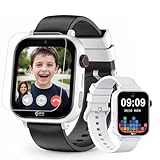
Overview: Nearly identical to Product 7 but in black, this Kipywatch variant offers GPS tracking, video calls, and School Mode via a subscription-based parental app. Tailored for boys aged 3-12, it emphasizes safety and routine-building with minimal setup.
What Makes It Stand Out: Real-time geofencing alerts and seamless video calling remain its crown jewels. The reward system (sending “hearts” for completed tasks) encourages positive habits, while School Mode ensures focus without disabling emergency functions. IP67 rating and included screen protector boost longevity.
Value for Money: Same subscription model as Product 7, but the black color option may appeal to older boys. Value hinges on parental need for GPS—it’s pricier than non-GPS watches but justified for location-critical use cases. The ready-to-gift packaging adds convenience.
Strengths and Weaknesses: Strengths: Precise location history; user-friendly app; reliable video/voice communication; effective School Mode; durable build. Weaknesses: Mandatory subscription inflates cost; no standalone health features; contact list restricted to pre-approved numbers.
Bottom Line: A solid safety tool for parents prioritizing location monitoring and video contact. Choose over Product 7 only for color preference; otherwise, identical in function and value proposition.
Understanding Core Safety Features for School Environments
Real-Time Location Tracking Accuracy
Precise, reliable location data is non-negotiable for school-day peace of mind. Look beyond basic GPS; the best options for 2026 integrate multi-source positioning (GPS, GLONASS, Galileo, plus Wi-Fi and cellular triangulation) to ensure accuracy even in dense urban areas, inside large school buildings, or near playground structures where signals can weaken. Verify how frequently the location updates – too infrequent leaves gaps, while constant high-frequency tracking drains battery life rapidly. Consider features like geofencing that trigger alerts when your child enters or leaves designated safe zones like the school campus or bus stop.
Emergency Alert Systems and SOS Functionality
A dedicated, easily accessible SOS button is crucial. In 2026, evaluate how the alert works: does it send an immediate notification with precise location to multiple pre-set contacts? Does it initiate a silent call to listen in? Crucially, check if the watch can automatically detect hard falls or prolonged inactivity and trigger an alert – a valuable feature for playground accidents. Understand the process for canceling a false alarm to avoid unnecessary panic, and ensure the system works reliably even if the child is too distressed to press the button multiple times.
Two-Way Communication Capabilities
Clear, controlled communication is vital. Prioritize watches offering direct voice calling to pre-approved contacts only, minimizing spam or unwanted contact. Assess audio quality in noisy environments like hallways or cafeterias. While messaging is common, consider if the interface is simple enough for young children to use effectively during brief moments (like waiting for the bus) without becoming a distraction during class. Some 2026 models offer parent-initiated “listen in” features for ambient sound checks, but understand the privacy implications and school policy regarding this.
Navigating School Policies and Distraction Prevention
Compliance with School Technology Rules
School policies on wearables are stricter and more varied than ever in 2026. Before purchasing, obtain a copy of your school’s specific policy regarding smartwatches. Key questions: Are they permitted at all? Must they be powered off during school hours? Are specific features (like cameras, internet access, or games) banned? Some schools now require devices to connect only to approved parental apps with strict classroom mode enforcement. Choosing a watch designed with school compliance in mind prevents confiscation and frustration.
Effective Classroom Mode and Do-Not-Disturb Settings
This is arguably the most critical feature for school success. A robust classroom mode should completely disable non-essential functions: no screen notifications, no app access, no games, and ideally, a darkened or locked screen. It should only allow essential safety features like the SOS button and location tracking to remain active. Look for modes that activate automatically based on location (geofencing the school) or schedule, minimizing reliance on the child remembering to enable it. Verify that the watch cannot be easily overridden by the child.
Minimizing Visual and Auditory Distractions
Beyond classroom mode, consider the watch’s inherent design. A small, monochrome display is far less distracting than a bright, colorful touch screen. Haptic (vibration) alerts are preferable to audible chimes or beeps that can disrupt class. Evaluate how notifications are presented – a simple vibration for an important parent message is acceptable; a flashing game icon or social notification is not. The physical design should also discourage fidgeting; a secure, comfortable strap is essential.
Battery Life and Durability for the School Day
All-Day Battery Performance Requirements
School isn’t over when the final bell rings; think carpools, after-school clubs, and the journey home. A watch must reliably last at least 12-14 hours under typical school-day usage (location tracking intermittently, occasional calls/messages, basic time functions). Prioritize models with efficient processors and power-saving modes that kick in when the battery gets low, preserving core safety functions. Fast charging is a significant plus – being able to add several hours of life in 15-20 minutes during a morning routine is invaluable.
Rugged Construction for Active Kids
Schools are tough environments. The watch must withstand drops onto concrete, splashes in the cafeteria, scrapes on the playground, and general wear-and-tear. Look for military-grade durability standards (like MIL-STD-810H), a scratch-resistant screen (Gorilla Glass or equivalent), and strong water resistance (ATM 5 or IPX8 rating for swimming and heavy rain). The strap should be secure (silicone is common), comfortable for all-day wear, and difficult for small hands to accidentally unfasten.
Ease of Charging in Family Routines
Consider the charging logistics. Is the charger simple for a parent (or older child) to use? Does it require a proprietary dock, or does it use standard USB-C? Can it be charged quickly overnight? Watches that charge via a simple magnetic puck are often easier for kids to handle than those with finicky ports. Avoid models requiring complex charging cases that are easily lost.
Connectivity, Privacy, and Parental Control Essentials
Reliable Network Coverage for Safety
Cellular connectivity (4G LTE or emerging 5G bands for kids’ devices) is essential for real-time location and communication outside of home Wi-Fi range. Verify the network provider’s coverage map for your specific areas – school, bus routes, walking paths. Poor signal strength renders location tracking useless. eSIM technology, becoming standard in 2026, offers flexibility to switch carriers without swapping physical chips, which is helpful if coverage changes.
Robust Data Security and Privacy Protections
Children’s data privacy is paramount. Investigate the manufacturer’s privacy policy thoroughly: What data is collected (location, usage, voice)? How is it encrypted in transit and storage? Is it ever sold or shared with third parties? Look for compliance with strict regulations like COPPA (Children’s Online Privacy Protection Act) and GDPR-K (for relevant regions). Opt for services where data is stored securely and access is tightly controlled. Avoid watches with vague privacy policies or excessive data harvesting.
Granular Parental Control Interfaces
Your control app is your command center. It needs to be intuitive, reliable, and offer precise control. Essential features include: setting strict contact lists (only parents/guardians), managing geofences and alerts, scheduling classroom mode, monitoring battery life remotely, viewing location history securely, and remotely locking the device if lost. Look for apps that provide clear activity logs (who called when) without being overly intrusive into your child’s basic interactions. Two-factor authentication for the parent app is a must.
Age Appropriateness and Usability Factors
Matching Features to Developmental Stage
A watch packed with features suitable for a 12-year-old is overwhelming and inappropriate for a 6-year-old. Consider your child’s maturity: Can they responsibly use communication features? Do they understand not to share location data? Younger children (K-3) often benefit from simpler interfaces focused solely on calling parents and location tracking, with minimal app access. Older elementary and middle schoolers might responsibly handle limited messaging or step counting, but strict controls on social features are still essential. Avoid “feature creep” that adds distraction.
Intuitive Child-Friendly Interface Design
The watch interface must be effortless for a child to use, especially in moments of stress. Large, clear icons, simple swipe or button navigation (not complex touch gestures), and a bright, readable screen are key. Can your child easily find and press the SOS button with one hand? Can they answer a parent’s call without fumbling? Voice command functionality can be helpful but should be optional and reliable. The setup process for the child should be straightforward, guided by the parent via the app.
Comfort and Wearability for All-Day Use
If it’s uncomfortable, your child won’t wear it – rendering safety features useless. Consider weight (lighter is better for small wrists), strap material (hypoallergenic silicone is standard), and adjustability for growth. The watch face shouldn’t be so large it catches on backpacks or sleeves. Ensure the buckle or clasp is secure but easy for the child to manage independently for bathroom breaks or sports. Breathable materials prevent skin irritation during long wear.
Cost Considerations and Long-Term Value
Upfront Device Cost vs. Ongoing Subscription Fees
The initial purchase price is just the start. Most cellular-connected kids’ smartwatches require a monthly service plan. Carefully compare plans: what data allowance is included? Are there fair usage policies? What is the cost per month, and are there annual discounts? Factor in potential costs for accessories like extra straps or screen protectors. A slightly more expensive device with a cheaper, reliable plan might offer better long-term value than a cheap watch with a costly subscription.
Expected Device Lifespan and Upgrade Cycles
Kids outgrow tech fast, both physically and in terms of feature needs. Research the typical lifespan of the device – how long does the manufacturer provide software updates and security patches? Is the hardware robust enough to last 1-2 school years? Consider if the design is easily adjustable for growth. Avoid putting a very expensive, high-end watch on a young child who might lose it or quickly need different features as they age. Focus on value for the expected usage period.
Warranty Coverage and Support Quality
A solid warranty (at least 1 year, preferably 2) covering defects and sometimes accidental damage is crucial. Understand what’s included and excluded. Research the manufacturer’s customer support reputation – is help readily available via chat, phone, or email? Are replacement parts accessible? Good support can make the difference between a minor hiccup and a major disruption, especially when the device is integral to daily school safety routines.
Frequently Asked Questions
Can my child use the smartwatch during class in 2026?
Most schools strictly prohibit active use of smartwatches during instructional time. The primary purpose for school is safety (location tracking, emergency alerts) with all distracting features like notifications, apps, and screens disabled via mandatory “Classroom Mode.” Always confirm your specific school’s policy, as violations can lead to confiscation.
How do I prevent my child from playing games or using distracting apps at school?
Choose a model with a robust, non-overrideable Classroom Mode that automatically disables all non-essential apps and notifications based on location (geofencing the school) or schedule. Ensure the screen remains dark or locked during these times, accessible only to the SOS function. Parental controls should prevent the child from deactivating this mode.
Are kids’ smartwatches safe from hackers or data theft in 2026?
Reputable brands prioritize security with end-to-end encryption for data and communication, regular security updates, and strict adherence to children’s privacy laws (like COPPA). Avoid obscure brands with poor privacy policies. Always enable strong passwords and two-factor authentication on your parent control app for maximum security.
What happens if the smartwatch battery dies during the school day?
This is why all-day battery life (12+ hours) is critical. Choose a watch known for reliable battery performance under school-use conditions. Implement a strict charging routine (e.g., every night). Some models offer low-battery alerts to parents and enter an ultra-low-power “safety mode” that preserves basic location tracking for several extra hours when the battery is critically low.
Do all kids’ smartwatches require a separate cell phone plan?
Cellular-connected watches (the most useful for school safety) do require a dedicated data plan, usually through the watch manufacturer or a mobile carrier. Some basic models only work via Bluetooth to a parent’s phone, but these lose functionality (like location tracking) the moment the child is out of Bluetooth range, making them impractical for school commutes or campus safety.
Can the school block the smartwatch signal?
Schools generally cannot block specific cellular signals without jamming devices (which are illegal for public use in most places). However, schools can enforce policies requiring watches to be powered off or in airplane mode (disabling cellular/Wi-Fi). Choosing a watch with reliable Classroom Mode that meets school policy is the solution, not signal blocking.
How accurate is the location tracking inside the school building?
Accuracy indoors varies significantly. Multi-source positioning (GPS + Wi-Fi + cellular) provides the best chance, often pinpointing within 10-30 feet near windows or on lower floors. Deep inside large buildings, accuracy may drop to 50-100+ feet. Location history showing movement patterns (e.g., arriving at the school address) is often more reliable than pinpointing the exact classroom.
Are there health concerns with kids wearing smartwatches all day?
Reputable kids’ smartwatches emit very low levels of RF radiation, well below international safety limits (SAR values). They are considered safe for continuous wear. If concerned, look for models with the lowest published SAR values. The greater health consideration is ensuring the watch strap is comfortable and doesn’t cause skin irritation during long wear.
What’s the youngest age appropriate for a school smartwatch?
There’s no universal age, but maturity is key. Generally, children entering kindergarten or first grade (ages 5-7) who walk to school, take the bus, or attend after-school activities alone may benefit. The child must understand basic instructions (e.g., “press this button only in an emergency,” “don’t tell anyone your location”). Simpler watches with fewer features are better for younger children.
How can I test if a smartwatch meets my school’s policy before buying?
Contact your school administrator before purchasing. Provide the specific model name and ask explicitly: 1) Is this model permitted? 2) Must it be in a specific mode (e.g., powered off, airplane mode, or specific classroom mode)? 3) Are any features (camera, internet) absolutely prohibited? Reputable manufacturers often list school-compliant models on their websites based on common policy requirements.
See Also
- How to Choose the 10 Best Kids Smartwatches for Your Child’s Age in 2026
- 10 Best Value Kids Smartwatches for School and Play in 2026
- 10 Best Value Kids Smartwatches for School Safety in 2026
- 2026’s Top 10 GPS Smartwatches for Kids Who Walk to School Alone
- How to Choose the 10 Best Kids Smartwatches for Everyday Use in 2026